
Introduction

Framer supports SEO, but its solid foundations still need human checks. The platform automatically generates a sitemap.xml and a robots.txt and delivers pre-rendered HTML pages to crawlers, resolving the old crawlability problem with React sites. Yet most indexing failures observed on Framer sites stem from settings left at their defaults or configured incorrectly, rather than from the platform itself.
Five actions to complete in the first 30 minutes:
- Check the indexing toggle: in Site Settings, make sure “Allow indexing” is enabled for every page you want indexed.
- Submit the sitemap: open
votredomaine.com/sitemap.xmland submit this URL in Google Search Console using the custom domain, never the Framer subdomain. - Set unique titles and meta descriptions for every key page, avoiding generic values inherited from the global settings.
- Add alt attributes to every image, including those in CMS collections.
- Connect GA4 through Site Settings to have analytics tracking in place from launch.
A Framer site that has not been published with its custom domain connected has no sitemap Google can use. The correct sequence is to connect the domain, publish the site, then submit the sitemap.
Key takeaways
SEO for a Framer site rests on solid technical foundations, but requires systematic human checks to avoid the most common indexing pitfalls.
| Point | Details |
|---|---|
| Check indexing first | A forgotten noindex toggle is the most common reason Framer pages are missing from Google. |
| Sitemap and custom domain | Submit votredomaine.com/sitemap.xml in GSC, never the Framer subdomain URL. |
| CMS metadata at scale | Use the dynamic variables {{Title}} and {{Description}} with dedicated fields in each collection. |
| Core Web Vitals | Heavy animations and third-party scripts are the main causes of performance deterioration on Framer. |
| No native JSON-LD | Structured data (Article, FAQ, LocalBusiness) is added manually through a custom code block. |
| Pharelia | A free technical audit covering indexing, the sitemap, metadata, Core Web Vitals, and AEO/GEO recommendations. |
Table of contents
- Which SEO features does Framer handle natively?
- How do you configure titles, meta descriptions, and Open Graph effectively?
- Sitemap, robots.txt, redirects, and canonicals: how do they work in Framer?
- How do you optimize SEO for CMS pages and dynamic content?
- What are the Core Web Vitals risks on a Framer site?
- Framer's AI agents: when should you use them, and when should you be cautious?
- How do you resolve sitemap and indexing problems on Framer?
- SEO checklist for a Framer site: technical and editorial priorities
- Why audit a Framer site before writing any content?
- Pharelia audits and optimizes your Framer site
- Sources
- Frequently asked questions
Which SEO features does Framer handle natively?
Framer optimizes SEO by default: sitemap.xml and robots.txt are generated and updated automatically whenever the whole site is published. Pages are delivered as pre-rendered static HTML through a global CDN, ensuring reliable indexing without relying on client-side JavaScript rendering.
Native features cover the essential technical foundations:
- Automatically generated sitemap.xml and robots.txt, reflecting the site's published state.
- Server-side pre-rendering: complete HTML delivered to Google and Bing crawlers.
- Image optimization: automatic WebP/AVIF conversion,
srcsetattributes, and lazy loading at CDN level. - Per-page SEO controls: title, meta description, Open Graph, indexing toggle, and canonical URL.
- Dynamic variables for CMS templates (
{{Title}},{{Description}}), enabling unique metadata at scale. - 301/308 redirects configurable from the settings panel.
- Support for `.well-known` files for ownership verification and third-party protocols.
Framer's SEO product page also details its built-in AI agents: metadata generation, an AEO scanner (answer engine optimization), and centralized indexing controls. These tools speed up compliance work on sites with large numbers of pages, provided every output undergoes editorial review.
Pro tip: enable the Google Tag Manager integration in Site Settings to centralize all your third-party scripts without adding code to every page's source.
How do you configure titles, meta descriptions, and Open Graph effectively?
The recommended workflow distinguishes three levels: global site values, overrides for static pages, and templates for CMS collections.
- Set global values in Site Settings > SEO: define a default site title and meta description as a safety net for pages without an override.
- Override at page level: for each strategic page, open its SEO panel and enter a unique title (50–60 characters) and meta description (150–160 characters).
- Configure CMS templates: use the dynamic variables
{{Title}}and{{Description}}in the collection template's SEO fields. Check that every published CMS item has these fields filled in. - Test Open Graph: use Meta's debugging tool (Facebook/Meta Sharing Debugger) or Opengraph.xyz to preview how the page will appear on social media before publishing.
- Inspect URLs in GSC: after publishing, use Google Search Console's “URL Inspection” tool to confirm that Google sees the expected title and meta description.
Pro tip: plan your slugs before launch and document your naming conventions in a shared file. Renaming a slug after indexing requires a 301 redirect, and each additional redirect risks losing signals if configured incorrectly.
Sitemap, robots.txt, redirects, and canonicals: how do they work in Framer?
The Framer sitemap and its constraints
The Framer sitemap is available at votredomaine.com/sitemap.xml and contains only published pages. One critical detail: it is regenerated only when the whole site is published. A new CMS item added without republishing will not appear in the sitemap, and therefore will not enter Google's crawl queue.
Another constraint: before the custom domain is connected, the sitemap is available on the Framer subdomain (monsite.framer.website/sitemap.xml). Submitting this URL to GSC instead of the custom domain URL is the most common source of errors reported by users.
Redirects, canonicals, and robots.txt
- 301 and 308 redirects: configurable in Site Settings > Redirects. 301 redirects pass ranking signals (“link equity”) to the new URLs, making them essential after any page rename or migration.
- Canonical tags: Framer generates canonical tags pointing to each page's canonical URL. A manual override is possible if you manage syndicated content or page variants.
- Robots.txt: the default file allows crawling of all indexable pages. You can add custom directives in the site's advanced settings.
- `.well-known` files: supported natively for DNS verification and security protocols.
GSC troubleshooting checklist
- Is the custom domain connected, and was the site republished after connecting it?
- Does the URL submitted in GSC match
https://www.votredomaine.com/sitemap.xmlexactly? - Is the indexing toggle enabled on the affected pages?
- Are there redirect loops or redirect chains with more than two hops?
Pro tip: after any migration or domain reconnection, republish the entire site before submitting the sitemap to GSC. A partial publication generates an incomplete sitemap.
How do you optimize SEO for CMS pages and dynamic content?
Framer CMS collections let you manage hundreds of pages with unique metadata, provided you structure the fields when creating the collection.
- Dedicated fields to create:
Title(SEO title),Meta Description,Excerpt(a short summary for listings), andAlt Text(for each item's main image). - Bind the variables in the collection's SEO template:
{{Title}}for the page title,{{Meta Description}}for the meta description, and{{Alt Text}}for the hero image's alt attribute. - Check every published item: a CMS item without a title inherits the global site title, producing duplicate tags detected by GSC.
- Localized slugs: for a French-language site targeting France, create French slugs from the start (
/guide-seo-framerrather than/framer-seo-guide). - Frequent updates: republish the site after every batch of CMS items to update the sitemap.
Alt attributes on CMS images are not optional: Google Images is a significant discovery channel, and an empty or generic alt attribute (image-1.jpg) deprives each page of an additional relevance signal. Binding a dedicatedAlt Textfield in the collection takes five minutes and applies across the catalog.
What are the Core Web Vitals risks on a Framer site?
Framer offers good foundations by default: a global CDN, HTML pre-rendering, and automatic image optimization.
Performance problems almost always come from three sources:
- Heavy animations: Framer's transitions and micro-animations are visually polished, but piling effects onto a single page can worsen LCP (Largest Contentful Paint) and cause CLS (Cumulative Layout Shift) if elements move during loading.
- Third-party scripts: every external script (chat, heatmaps, advertising) adds blocking time. A single poorly optimized script can move a score from “Good” to “Needs improvement”.
- Unoptimized CMS images: images uploaded directly to CMS items without resizing first sometimes bypass automatic optimization.
Tools to use for diagnosis: PageSpeed Insights (the “Origin Summary” view for real field data), Google Search Console's Core Web Vitals report, and the Chrome UX Report for real-world usage data on your domain.
Priority fixes: limit third-party scripts to the essentials, upload AVIF or WebP images resized to their intended display dimensions, and shorten animations on elements above the fold.
Framer's AI agents: when should you use them, and when should you be cautious?
Framer's AI agents cover three productive use cases: suggesting titles and meta descriptions, detecting pages without metadata, and suggesting anchor text for internal links. On a site with fifty pages or more, these tools save meaningful time during the initial audit.
Their limitations are equally real:
- Generic wording: automatic suggestions tend to use similar phrasing from one item to the next, producing meta descriptions that are too alike for distinct pages.
- No business context: the agent does not know your positioning, personas, or keyword strategy. It generates plausible text, not text optimized for your audience.
- Risk of weak content: publishing generated metadata in bulk without review can undermine quality signals, particularly on sites with large volumes of CMS content.
Pro tip: use the AI agent to identify pages without titles or with overly short meta descriptions, then manually correct high-priority pages (the homepage, service pages, and pillar articles) before approving suggestions for secondary pages.
For more on producing SEO and AEO content, Pharelia's SEO content resources cover editorial structure and E-E-A-T requirements.
How do you resolve sitemap and indexing problems on Framer?
GSC errors on Framer sites follow a recurring pattern. Feedback from the Framer community confirms that most incidents can be resolved with this sequence:
- Check that the site is published with its custom domain connected. Open
votredomaine.com/sitemap.xmlin a browser: if it returns a 404 error, the site is unpublished or the domain is configured incorrectly. - Compare the URLs: note the sitemap URL on the Framer subdomain (
monsite.framer.website/sitemap.xml) and on the custom domain. Both should exist; only the custom domain should be submitted to GSC. - Check indexing toggles: in Framer, open each strategic page and confirm that “Allow indexing” is enabled. A page left on noindex during development is often forgotten after launch.
- Add the property in GSC: verify it using the HTML tag or DNS method, then submit
https://www.votredomaine.com/sitemap.xml. - Inspect problematic URLs: use GSC's “URL Inspection” tool for each unindexed page and read the exact reason (noindex, crawl error, redirected page).
- Republish after corrections: changes to an indexing toggle or redirect require republishing before they are reflected in the sitemap.
If the problem persists, Framer community support threads on sitemaps document more complex cases and the solutions applied.
Pro tip: before contacting Framer support, prepare a browser screenshot of the accessible sitemap, the exact URL submitted in GSC, and the complete GSC error message. This can shorten resolution time by several days.
SEO checklist for a Framer site: technical and editorial priorities
Immediate priorities
- Indexing toggle enabled on all pages you want in search results.
- Sitemap submitted in GSC using the custom domain URL.
- Unique title (50–60 characters) and unique meta description (150–160 characters) on every key page.
- Alt attributes filled in on all images, including CMS items.
- GA4 connected through Site Settings.
- GSC property verified and coverage report monitored.
Important priorities
- JSON-LD structured data for rich content:
Article,FAQPage, orLocalBusiness, depending on the type of site. Framer does not generate these tags natively; they are added through a custom code block. - Check the HTML heading hierarchy (one H1 per page, consistent H2/H3 structure): WAI accessibility techniques remind us that correct semantic markup improves understanding for search engines as well as users.
- Core Web Vitals: a PageSpeed Insights audit, fixes to third-party scripts, and an LCP check on mobile.
- Internal linking: structure links between pages to distribute relevance signals and make crawling easier.
Monthly operational routine
- Review the GSC coverage report: excluded pages and new crawl errors.
- Check new CMS items before publishing: title, meta description, alt text, and slug.
- Audit redirects after any page rename.
- Track rankings through GSC and GA4 to detect drops in organic traffic.
Why audit a Framer site before writing any content?
The most costly mistakes on Framer sites are not content mistakes. They are silent configuration errors: a forgotten noindex toggle on a service page, English slugs on a site targeting France, or an inconsistent HTML heading hierarchy because the designer used text sizes instead of semantic tags. These mistakes are invisible in the Framer editor; they show up only in GSC or during a technical crawl.
Verbi's independent analysis confirms this: Framer handles pre-rendering and image optimization well, but some controls are hard to find in the interface, explaining why technically well-built sites struggle to get indexed.
At Pharelia, we regularly work on Framer sites that have been live for several months without a single indexed page, simply because the custom domain was never connected correctly or the submitted sitemap pointed to the development subdomain. The Applewood (+300 % in SEO, +500 % in AI citations) and M2A (+86 % in one month) case studies illustrate the results of technical corrections followed by a structured editorial strategy.
Outsourcing becomes worthwhile when the CMS contains more than around fifty pages, the site targets several languages, or visibility in generative search engines (ChatGPT, Perplexity, Gemini) becomes a goal. In all three cases, configuring Framer alone is not enough: you need a content strategy, structured data, and AI mention tracking.

Pharelia audits and optimizes your Framer site
Your Framer site is live, but you are unsure whether Google is indexing it correctly? Pharelia's visibility audit covers the full technical scope: indexing checks, sitemap analysis, metadata checks, a Core Web Vitals audit, and AEO/GEO recommendations to help you appear in generative search engine answers.

The deliverable is a prioritized report with an implementation checklist you can apply directly in Framer, plus 14 days of support for minor corrections. For sites with large volumes of CMS content or multilingual needs, the Croissance offer covers content production and monthly rank tracking. The resources on AI search visibility (SEO, GEO, AEO) explain how Pharelia connects Google indexing with citations in generative AI. The initial audit is free: Pharelia.
Sources
Frequently asked questions
Does Framer have a built-in SEO system?
Yes. Framer automatically generates a sitemap.xml and a robots.txt and delivers pre-rendered HTML pages, ensuring crawlability. Metadata controls, redirects, and AI agents round out its native capabilities.
Which three types of SEO should a Framer site cover?
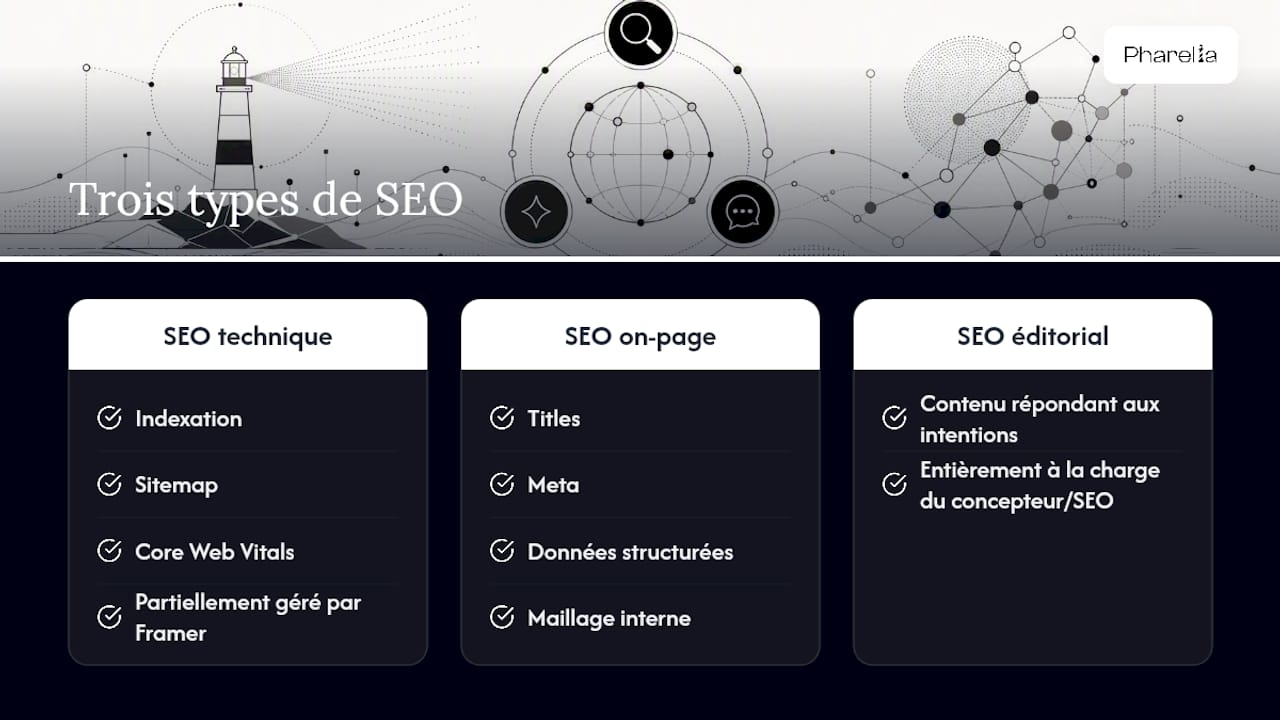
Technical SEO (indexing, sitemap, Core Web Vitals), on-page SEO (titles, meta descriptions, structured data, internal linking), and editorial SEO (content that meets search intent). Framer handles part of the first area; the other two remain entirely the responsibility of the designer or SEO manager.
Which free tool should you use to monitor SEO on a Framer site?
Google Search Console is the reference tool: it flags indexing errors, displays performance by query, and lets you submit the sitemap. PageSpeed Insights adds Core Web Vitals checks.
Why does my Framer sitemap not work in Google Search Console?
The most common cause is a mismatch between the submitted URL and the domain actually used: if you submitted the Framer subdomain URL before connecting your custom domain, GSC will not recognize the sitemap. Reconnect the domain, republish the site, then submit https://www.votredomaine.com/sitemap.xml.