
Introduction

For solid JavaScript SEO, one rule takes precedence: every page's structural elements (title, meta description, canonical, structured data) must appear in the initial HTML served by the server, before any JavaScript executes. Anything Google cannot see in this first HTML risks delayed indexing, or no indexing at all.
Immediate actions to start this week:
- Check 3 critical pages in Google Search Console using URL Inspection: compare the raw HTML (‘view-source:’) with the rendered HTML.
- Ensure
<title>,<meta name="description">and<link rel="canonical">appear in the initial HTML without waiting for hydration. - Check that your
robots.txtdoes not block access to JavaScript and CSS files. - Enable JavaScript rendering in Screaming Frog to crawl your pages as Googlebot sees them after rendering.
- If your website is a purely client-rendered SPA (single-page application), plan a migration to SSR, SSG or ISR.
- Add Lighthouse CI to your deployment pipeline to detect regressions before they reach production.
Pro tip: Run a live URL Inspection test (‘Test live URL’) on your homepage and a key product or service page. If the title displayed in the rendered output differs from the raw HTML title, you have an active indexing problem.
Key takeaways
JavaScript SEO rests on one central principle: anything absent from the initial HTML served by the server is potentially invisible to Google during crawling.
| Point | Details |
|---|---|
| A three-phase rendering pipeline | Google crawls the raw HTML, queues the page in WRS, then renders it through headless Chromium with a variable delay. |
| SSR, SSG or ISR for public pages | Avoid pure CSR for any page intended for indexing; prefer Next.js, Nuxt or Astro. |
| Meta tags in the initial HTML | The title, meta description and canonical must appear in the server-served HTML, not after hydration. |
| An approximate WRS timeout of 5 seconds | An oversized bundle or slow network calls can cause incomplete rendering and partial indexing. |
| Pharelia: a free audit and targeted fixes | Pharelia audits headless rendering, Search Console coverage and Core Web Vitals, then prioritises fixes. |
Table of contents
- How Google processes and indexes JavaScript pages
- Which JavaScript rendering mode should you choose for your website?
- Are your title, canonical and meta robots tags really in the initial HTML?
- How can you make an SPA compatible with Google search?
- Performance, caching and images: what WRS will not tolerate
- Structured data and Shadow DOM: what Google actually sees
- How do you audit JavaScript SEO step by step?
- The technical checklist to give your developers
- Pharelia's methodology for fixing JavaScript SEO problems
- Sources
- Frequently asked questions
How Google processes and indexes JavaScript pages
Understanding Google's processing pipeline is the foundation of any SEO work on JavaScript applications. The process has three distinct phases, and most indexing problems arise precisely between the first and third.
Phase 1: crawling the raw HTML. Googlebot retrieves the page and reads the HTML as served by the server. No JavaScript executes at this stage. Google records the links, meta tags and textual content visible in this initial HTML.
Phase 2: joining the rendering queue. If the page contains JavaScript, it is placed in the Web Rendering Service (WRS) queue.
Phase 3: rendering with headless Chromium. WRS executes the page in a Chromium browser without a graphical interface, collects the rendered HTML and uses it for final indexing. This rendered HTML determines what Google actually indexes.
Google's Web Rendering Service uses a Chromium version that is not always up to date with the browser's latest stable release. Some recent JavaScript APIs may not be supported, which can cause silent rendering errors. Google explicitly recommends placing critical elements in the initial HTML rather than relying on client rendering to make them accessible to crawlers.
Several content categories are generally not rendered by Google: service workers, content displayed only after user interaction (clicking, scrolling, forms), and elements blocked behind a consent wall (GDPR). HTTP codes also matter: a page returning 200 with empty HTML is treated as valid content, even if it contains nothing useful. This is called a soft 404, and Google Search Console can help identify them.
The practical implications are straightforward:
- Content loaded only after a client-side API call may never be indexed if rendering takes too long.
- Migrations to SPAs without SSR have caused significant indexing losses, with documented cases in which a substantial share of product pages disappeared from the index.
- The delay between crawling and rendering means client-side content updates may take several weeks to appear in search results.
Which JavaScript rendering mode should you choose for your website?
Five rendering strategies coexist today, each with its own SEO trade-offs. The choice depends on URL volume, how often content changes and infrastructure constraints.
CSR (Client-Side Rendering): the initial HTML is almost empty, and JavaScript generates all content in the browser. This is the default mode of frameworks such as React or Vue without additional configuration. The highest SEO risk: Google must wait for WRS rendering to see the content, and that rendering may be incomplete or delayed.
SSR (Server-Side Rendering): the server generates complete HTML for every request. Immediate visibility for Googlebot, but higher server costs and greater infrastructure complexity. Recommended for pages with frequently updated dynamic content (e-commerce, news).
SSG (Static Site Generation): pages are generated at build time and served as static HTML files. Maximum performance and no rendering delay for Google. Ideal for websites with stable content (documentation, blogs, landing pages). In 2026, Astro is often cited as the reference framework for content-focused websites because it ships zero JavaScript by default.
ISR (Incremental Static Regeneration): a compromise between SSG and SSR, popularised by Next.js. Suitable for e-commerce catalogues with thousands of products whose prices change regularly.
Dynamic prerendering: middleware detects crawlers and serves them a prerendered version of the page, while users receive the normal SPA. An acceptable workaround for gradual migrations, but avoid it as the target architecture because it introduces a dependency on a third-party service.
| Criterion | CSR | SSR | SSG | ISR |
|---|---|---|---|---|
| Immediate visibility for Googlebot | No | Yes | Yes | Yes |
| Server cost | Low | High | Very low | Medium |
| Real-time content | Yes | Yes | No | Partial |
| Infrastructure complexity | Low | High | Very low | Medium |
| Recommended for indexable pages | No | Yes | Yes | Yes |
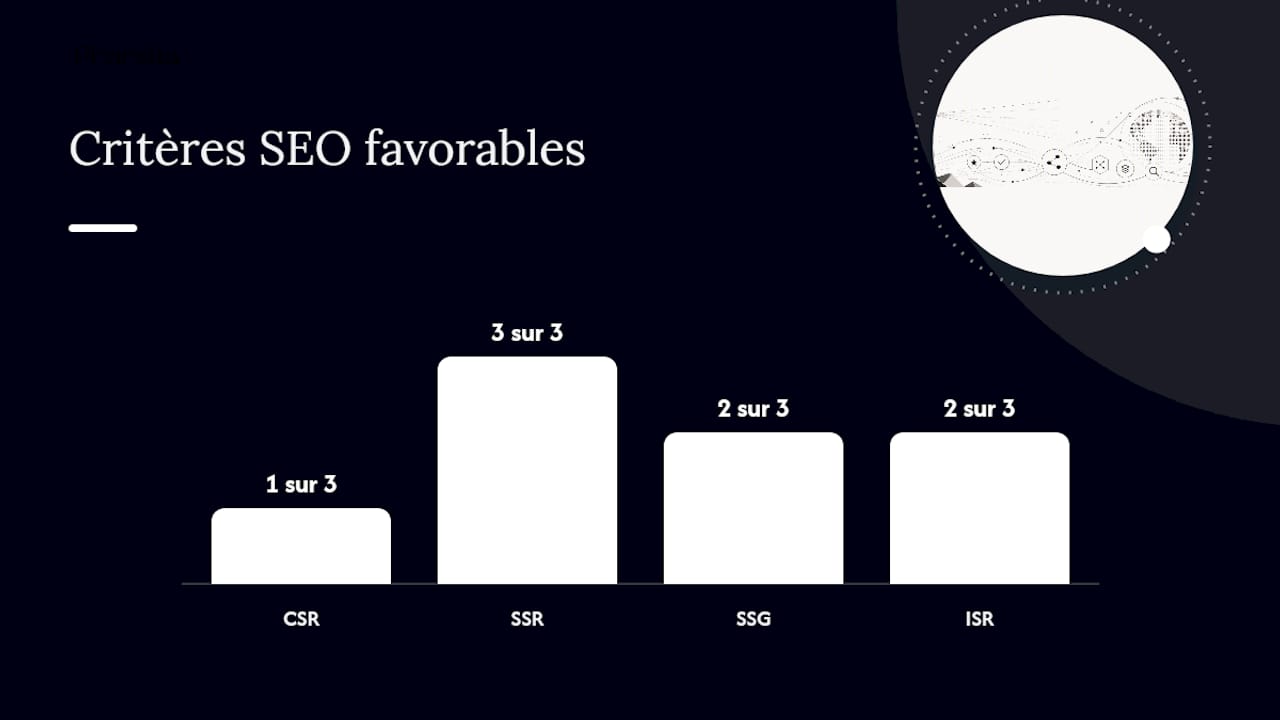
For public pages intended for indexing (product pages, articles, landing pages), SSR, SSG or ISR are the only viable options. Pure CSR can remain acceptable for authenticated interfaces (dashboards, member areas) not intended for indexing.
Are your title, canonical and meta robots tags really in the initial HTML?
This is the question most directly connected to JavaScript's SEO impact, and the answer is often no on the projects we audit. Here are the rules to apply.
Absolute priority: inject <title>, <meta name="description"> and <link rel="canonical"> into the HTML served by the server. If these tags are absent from the raw HTML and added only after JavaScript hydration, Google may ignore them or use an incorrect default during the initial crawl.
If you must define these tags through JavaScript (SPAs without SSR), use libraries such as React Helmet or Next.js Head to inject tags into the <head> during server rendering. Always check with ‘view-source:’ that the tags appear in the raw HTML, not only after JS execution.
Behaviours to avoid completely:
- Defining two different
<link rel="canonical">tags: one in the initial HTML and another injected by JavaScript. Google may interpret this conflict unpredictably. - Using URL fragments (
#) for client-side routing: Google does not crawl fragment URLs as distinct pages. - Changing the
<meta name="robots">tag through JavaScript to block indexing: behaviour is not guaranteed, depending on when Google reads the page. - Leaving a generic
<title>(‘React App’, ‘My App’) in the initial HTML and replacing it only after data loads.
Pro tip: Use Google Search Console's URL Inspection tool in ‘Test live URL’ mode and compare the ‘Page title’ field with what you see in the source code. Any discrepancy indicates late injection.
An example of a correct HTML structure for an SSR product page:
<head> <title>Chaussures de trail Gore-Tex homme — Marque X</title> <meta name="description" content="Découvrez notre sélection de chaussures trail imperméables..."> <link rel="canonical" href="https://exemple.fr/chaussures-trail-homme/"> <script type="application/ld+json">{"@context":"https://schema.org",...}</script> </head>For more on structuring indexable content, Pharelia's technical SEO resources cover tag audits and priority fixes.
How can you make an SPA compatible with Google search?
Single-page applications present specific JavaScript SEO challenges, but all can be solved with good coding practices.
Routing and URLs:
- Use the History API (
pushState) to manage transitions between views. This creates clean URLs Googlebot can crawl as distinct pages, provided each URL returns meaningful server-side HTML. - Configure your server to respond to every route with the correct HTML, not only the root
/. A server that always returnsindex.htmlfor every route prevents Google from distinguishing pages. - Avoid fragments (
#/produit/123): pushState manages URLs cleanly without reloading the page, making URL extraction easier for crawlers.
HTTP codes and error handling:
- A nonexistent page must return a real 404 code, not 200 with a ‘Page not found’ message.
- Permanent redirects must use server-side 301 codes, not client-side JavaScript redirects.
- Monitor server-side JavaScript exceptions: an unhandled error in SSR rendering can produce empty HTML returned with a 200 code, creating an invisible soft 404.
Links and navigation:
- Use standard
<a href="...">elements for all navigable links. Googlebot does not follow links created only throughonclickhandlers without anhrefattribute. - Check that your internal linking appears in the initial HTML rather than being generated dynamically after loading.
Pro tip: Set up automated regression tests that check after every deployment that critical pages return non-empty HTML with the expected tags. Puppeteer or Playwright can automate this check in a few lines.
Recommended regression tests:
- Check that every main route returns the correct HTTP code (200, 301, 404).
- Check that
<title>and<canonical>appear in the raw HTML. - Validate that
<a href>links to child pages appear without JS. - Test headless rendering with Puppeteer to detect silent JS errors.
- Compare the number of indexable words in the raw and rendered HTML.
Performance, caching and images: what WRS will not tolerate
Google's Web Rendering Service applies a rendering budget per page. Rendering that exceeds a few seconds may be abandoned, producing partial indexing. JavaScript bundle size and slow network calls can cause timeouts: this is a practical risk, not a theoretical one.
Bundle and cache optimization:
- Split your JavaScript bundle by route (code splitting) to load only the code each page needs.
- Move heavy processing (parsing, calculations) to Web Workers to free the main thread.
- Apply fingerprinting (hashes in filenames) to enable long-lived browser caching for static assets.
- Preload critical resources with
<link rel="preload">to speed up initial rendering.
Image lazy loading:
- Use the native
loading="lazy"attribute for off-screen images, but not for images visible above the fold (LCP). - Always specify
widthandheightattributes to prevent layout shifts (CLS, Cumulative Layout Shift). - Always fill in the
altattribute with an accurate description: it is an indexing signal for Google Images and an accessibility criterion. - Avoid hiding critical images behind an overly aggressive IntersectionObserver that delays their loading during WRS rendering.
Performance checklist before deployment:
- A Lighthouse Performance score above 70 in mobile mode.
- LCP (Largest Contentful Paint) below 2,5 seconds.
- INP (Interaction to Next Paint) below 200 ms: INP replaced FID as a Core Web Vitals metric and directly affects interactive JavaScript architectures.
- CLS (Cumulative Layout Shift) below 0,1.
- No JavaScript or CSS resources blocked in
robots.txt.
Structured data and Shadow DOM: what Google actually sees
Structured data (Schema.org in JSON-LD) enables rich results in Google. But its effectiveness depends entirely on when it is injected into the page.
Main rule: inject the <script type="application/ld+json"> block directly into the HTML served by the server, in the <head> or <body>. Client-side injection after hydration risks Google crawling the page before JavaScript executes and detecting no structured data.
Shadow DOM and web components: Google can read Shadow DOM content after WRS rendering, but this behaviour is not guaranteed for every shadow root type. Avoid placing critical SEO elements (titles, descriptions, links) exclusively in a closed Shadow DOM. Prefer the Light DOM or ensure the content is duplicated in the initial HTML.
Testing tools:
- Google Search Central's Rich Results Test validates structured data detection after rendering.
- URL Inspection in Google Search Console shows the rendered HTML as Google sees it, letting you check whether JSON-LD is present.
- Chrome DevTools (the ‘Elements’ tab) lets you inspect the DOM after hydration and compare it with the source HTML.
Pro tip: If you use a framework such as Next.js or Nuxt, place JSON-LD in the layout or page component at the server-rendering level, not in a `useEffect` or `onMounted`. These hooks run only on the client.
How do you audit JavaScript SEO step by step?
A reproducible audit procedure is the only way to diagnose rendering problems with certainty. Here is the tool-supported, sequential method we apply.
Step 1: select critical pages. Identify 5 to 10 commercially important pages (product pages, landing pages, articles generating traffic). These are your reference indicators.
Step 2: compare raw and rendered HTML in Search Console. For each URL, use URL Inspection, then ‘Test live URL’. Compare the source HTML (Ctrl+U) with the rendered HTML shown by Search Console. Record differences in content, tags and links.
Step 3: crawl in JavaScript mode with Screaming Frog. In Screaming Frog, enable JavaScript rendering (Configuration > Spider > Rendering > JavaScript). Compare the results with an HTML-only crawl to identify pages whose content is visible only after rendering.
Step 4: render pages through Puppeteer or Playwright. These tools simulate WRS behaviour with precise timeout control. A minimal Puppeteer example:
const browser = await puppeteer.launch(); const page = await browser.newPage(); await page.goto('https://exemple.fr/page/', { waitUntil: 'networkidle0', timeout: 5000 }); const html = await page.content(); console.log(html); await browser.close();Set the timeout to 5 seconds to simulate WRS's approximate rendering budget.
Step 5: measure Core Web Vitals with Lighthouse. Run Lighthouse in mobile mode on every critical page. Add Lighthouse CI to your pipeline to automate this measurement at every deployment.
Step 6: analyse server logs. Filter Googlebot requests in your logs (user-agent containing ‘Googlebot’). Look for abnormal patterns: frequent 5xx errors on JavaScript routes, no crawling of pages that are linked, or repeated crawling of the same URL without progressing to child pages.
The recommended practical tests cover URL Inspection, JS crawling with Screaming Frog, headless rendering with Puppeteer or Playwright, and Lighthouse CI for continuous monitoring.
The technical checklist to give your developers
This list is designed to be copied and passed directly to the technical team at the start of the engagement. Each point is prioritised by indexing impact.
Critical (fix before any deployment):
- A unique, descriptive
<title>in the initial HTML (not injected after hydration). <meta name="description">in the initial HTML.- A unique, consistent
<link rel="canonical">in the initial HTML. robots.txtallowing access to JavaScript and CSS files.- Correct HTTP codes: 404 for nonexistent pages, 301 for permanent redirects.
- An up-to-date XML sitemap submitted in Google Search Console.
High priority (fix within 7 days):
- Server-injected JSON-LD structured data.
- Navigation links using standard
<a href>elements. - Routing through the History API (
pushState), without#fragments. - No soft 404s (pages returning 200 with generic content).
Medium priority (schedule within 14 days):
- A Lighthouse Performance score above 70 on mobile.
- LCP below 2,5 seconds, INP below 200 ms, CLS below 0,1.
- Lighthouse CI integrated into the CI/CD pipeline.
- Automated regression tests on critical pages.
Quick checks in 30 minutes:
- Open 3 critical URLs with ‘view-source:’ and check for meta tags.
- Run URL Inspection on these same pages in Search Console.
- Run Puppeteer rendering with a 5-second timeout and compare the resulting HTML with the source HTML.
Common errors such as JS-injected canonicals, robots.txt blocking scripts and titles generated only after hydration cause most indexing problems we encounter on JavaScript websites.
Pharelia's methodology for fixing JavaScript SEO problems
Pharelia structures its work on JavaScript websites in four phases, each producing a measurable deliverable.
Phase 1: diagnosis. Crawl the website in HTML and JavaScript modes (Screaming Frog), cross-checking with Google Search Console coverage data and server log analysis. Objective: map the gap between what Google crawls and what it actually indexes.
Critical fixes (missing tags, soft 404s, blocked resources) come first, regardless of their technical complexity.
Pharelia publishes into existing stacks: Next.js, Nuxt, Astro, Gatsby or any custom framework.
Phase 4: continuous monitoring. Add Lighthouse CI to the CI/CD pipeline, alerts for Core Web Vitals regressions, and monthly index coverage tracking in Search Console. The objective is to detect regressions before they affect organic traffic.
Pro tip: Add an automatic CI/CD check after every build to verify that the 10 most important pages return non-empty HTML with the expected `<title>` and `<canonical>` tags. This test takes less than 2 minutes to run and prevents silent regressions.
These results are documented in Pharelia's client case studies. Every engagement starts with a free visibility audit based on crawl, Search Console and headless rendering data.
What poorly prepared JavaScript migrations really cost
The most worrying trend we observe in 2026 is not the adoption of JavaScript but migration to SPAs without prior SEO preparation. Capable technical teams deliver fast, well-designed React or Vue applications with a carefully crafted user experience.
What happens is predictable: the initial HTML is empty, Google takes several weeks to render all pages, and URLs gradually disappear from the index in the meantime. The loss is silent because Search Console does not say ‘your rendering failed’; it simply says the pages are no longer indexed.
My conviction is that robust initial HTML is the number one strategic priority for any JavaScript website in 2026, ahead of performance optimization, content and link building. A website whose initial HTML Google cannot read is invisible, whatever its content quality. Continuous governance, with SEO checks integrated into CI/CD through Lighthouse CI, is the only way to maintain this robustness over time without relying on occasional audits.
For decision-makers: schedule a JavaScript SEO audit before any migration to a new framework, not afterwards. The cost of a preventive audit is negligible compared with recovering indexing after migration.
Pharelia audits your JavaScript website and identifies indexing blockers
A poorly configured JavaScript website can lose a significant share of organic traffic without any visible warning in standard tools. Pharelia offers a free visibility audit covering this exact scope: crawling in HTML and JavaScript modes, Search Console coverage analysis, headless rendering of critical pages, and identification of the 3 priority fixes to apply immediately.

The deliverable is an action plan prioritised by impact and effort, with critical fixes clearly separated from secondary optimizations. For teams wanting to go further, Pharelia's monthly packages cover technical fixes, continuous monitoring and content production optimized for Google and AI engines such as ChatGPT, Perplexity and Gemini. If visibility in generative AI interests you, Pharelia's AI search optimization resources explain how a well-indexed website becomes a source cited by assistants.
Contact us for a diagnosis based on your actual data.
Sources
The following resources were used in this article and are recommended for exploring each aspect of JavaScript SEO in more detail.
Official documentation:
Technical guides:
Audit tools:
Pharelia resources:
Frequently asked questions
What is JavaScript SEO?
JavaScript SEO encompasses the technical practices that ensure pages generated or modified by JavaScript are correctly crawled, rendered and indexed by Google. It covers the choice of rendering mode (SSR, SSG, CSR) and the management of meta tags, structured data and HTTP codes.
Does JavaScript harm SEO in 2026?
JavaScript does not harm SEO in itself, but pure client rendering (CSR) introduces a delay between crawling and indexing that can reduce visibility. Google recommends placing critical elements in the initial HTML and favouring SSR or SSG for public pages.
Which JavaScript framework is best suited to SEO?
Next.js (React) and Nuxt (Vue) are the reference choices for SSR and ISR. Astro is particularly suitable for static-content websites because it generates pure HTML without unnecessary JavaScript by default. The choice depends on the existing architecture and team constraints.
How do I check what Google actually sees on my JavaScript pages?
Use the URL Inspection tool in Google Search Console and click ‘Test live URL’. Compare the displayed rendered HTML with the page source (Ctrl+U). Any difference in content, title or tags indicates a client-side rendering problem.
What is a soft 404, and why is it problematic for SEO?
A soft 404 is a page returning HTTP 200 (success) but displaying generic or empty content, such as ‘Page not found’. Google may index it as a valid page without useful content, diluting index quality and potentially harming the whole website. Google Search Console reports them in the coverage report.
Recommendation
- AI search optimization: SEO, GEO and AEO articles | Pharelia
- SEO boost for microbusinesses and SMEs: the 2026 guide | Pharelia
- SEO audit: the checklist we actually use | Pharelia
- SEO redesign: preserve your rankings in 2026 | Pharelia