
Introduction

Google Consent Mode v2 sends four consent parameters to all Google products — analytics_storage, ad_storage, ad_user_data and ad_personalization — and directly determines access to advertising and measurement features for traffic from the European Economic Area. Since March 2024, any site using Google Ads or Google Analytics 4 (GA4) with EEA traffic must send these four signals to retain full access to conversion reporting, remarketing audiences and modeling. The priority action is simple: check that your consent management platform (CMP) correctly maps its categories to the four API parameters, and initialize all these parameters to denied for the EEA before loading any Google tag.
Three points to keep in mind before going further:
- Consent Mode v2 is a technical signaling channel, not a CMP. It does not collect consent and does not replace the legal evidence you must retain.
- Responsibility for compliance remains entirely with the publisher under the GDPR and the ePrivacy Directive — Consent Mode does not automatically make you compliant.
- Immediate deliverables to prepare: inventory of active tags, CMP → API mapping plan, and technical acceptance testing protocol.
Pro tip: Before any change, export a snapshot of your Google Ads conversions and GA4 reports for the last 30 days. This baseline will be essential for measuring the impact after deployment.
Key takeaways
Consent Mode v2 requires sending the four consent parameters (analytics_storage, ad_storage, ad_user_data, ad_personalization) before loading any Google tag, initialized to denied for the EEA — this is the minimum condition for remaining compliant and preserving conversion modeling.
| Point | Details |
|---|---|
| Four mandatory parameters | ad_user_data and ad_personalization are new in v2 and essential for Enhanced Conversions and Google Signals. |
| Initialization before tags | gtag('consent','default') must precede any GTM or gtag.js loading, with all parameters set to denied for the EEA. |
| Basic vs advanced | Basic blocks tags (legally safer); advanced sends cookieless pings and enables advertiser-specific modeling. |
| Compliance is not automatic | Consent Mode does not replace the CMP or evidence of consent: responsibility remains with the publisher under the GDPR and CNIL requirements. |
| Pharelia audit | Pharelia covers the 10 technical, legal and business checkpoints with a report, GTM playbook and test plan. |
Table of contents
- How does Consent Mode v2 work technically?
- How do you implement Consent Mode v2 step by step?
- What Consent Mode does not do: legal risks to know
- What the technical implementation reveals about your measurement health
- Pharelia audits and implements Consent Mode v2 for you
- Official sources and useful reading
- Frequently asked questions
How does Consent Mode v2 work technically?
The Consent API relies on two distinct gtag calls, whose execution order is non-negotiable according to Google's official documentation:
gtag('consent', 'default', {...}): initializes consent states before loading any Google tag. For the EEA, all parameters must default todenied.gtag('consent', 'update', {...}): updates the states after the user interacts with the banner.
If default is called after a Google Tag Manager tag or gtag.js loads, the parameters are ignored for that session. This is the most common production error.
Basic mode vs advanced mode
Google distinguishes two behaviors depending on the mode chosen:
- Basic mode: Google tags are completely blocked until user interaction. No ping is sent if consent is refused. Conversion modeling is not available. This mode is the most legally conservative.
- Advanced mode: tags load in a restricted state as soon as the page opens. If consent is refused, cookieless pings are sent to Google. These pings contain functional information (timestamp, user-agent, network access point) but do not identify the user. They feed advertiser-specific conversion modeling, which is more precise than generic modeling.
Google products incorporating Consent Mode checks include GA4, Google Ads, Floodlight, Conversion Linker and Google Tag. In server-side tagging (sGTM), the consent signal must be explicitly propagated to the server container: it is not automatically transmitted from the browser.
Pro tip: In advanced mode, check in the network console that cookieless pings are sent with all four consent parameters in the payload. A ping without `ad_user_data` indicates incomplete CMP mapping.
How do you implement Consent Mode v2 step by step?
- JavaScript initialization: place the
gtag('consent', 'default', { ad_storage: 'denied', analytics_storage: 'denied', ad_user_data: 'denied', ad_personalization: 'denied', wait_for_update: 500 })call in the<head>, before any Google Tag Manager or gtag.js snippet. Consult the TagQueries implementation guide for recommended code snippets.
Pro tip: The most common errors according to field audits are a CMP loading too late (after GTM), incomplete mapping that omits `ad_user_data`, and failure to send the signal to the sGTM container. Check these three points first during acceptance testing.
What Consent Mode does not do: legal risks to know
Consent Mode v2 is a signal transmission channel, not a standalone compliance system. This confusion underlies most legal risks observed in production.
- It does not collect consent: the banner, storage of choices and timestamped evidence remain the responsibility of your CMP and organization.
- It does not replace GDPR documentation: the processing register, privacy policy, legal notices and evidence of consent are separate obligations.
- It does not protect against premature storage: if a tag loads before the
defaultcall, Consent Mode does not intervene.
The most common operational risks, documented by field audits:
- Incorrect CMP → parameter mapping (an ‘Advertising’ category that does not populate
ad_user_data). - Tags firing before the consent signal (CMP loaded too late in the DOM).
- Server-side container without explicit consent transmission.
- No initialization logs usable in the event of a CNIL inspection.
‘Using technical consent management solutions does not exempt the controller from its obligation to demonstrate that consent has been validly obtained.’ This position, consistently stated in EDPB guidelines, applies directly to Consent Mode.
Consequences of a faulty implementation may include CNIL formal notices, fines for placing trackers without valid consent, and an obligation to demonstrate compliance over a retrospective period. Involve your DPO in acceptance testing, retain initialization logs and document every version of the CMP mapping.
This article provides general information and does not constitute legal advice. Consult your DPO or specialist counsel to validate compliance for your specific situation.
What the technical implementation reveals about your measurement health
A poorly executed Consent Mode v2 deployment does more than break compliance: it silently distorts Google Ads automated bidding, which relies on conversion signals to optimize campaigns. When input data is corrupted by incorrect mapping or a faulty call sequence, the bidding algorithm makes decisions on a biased basis. Marketing teams then see CPA deteriorate without identifying the cause, because the problem is invisible in standard reports.
What I observe on audit projects is that most problems do not stem from a lack of Consent Mode knowledge, but from silos between teams. Marketing configures the CMP without consulting the CIO about script loading order. The CIO deploys GTM without validating the mapping with the DPO. The result: an implementation that is technically present but functionally faulty, passing superficial checks and failing in production.
The right approach is a joint project, with documented acceptance testing and post-deployment monitoring for at least 14 days. Clients following this method with Pharelia, such as those documented in our Applewood client cases and M2A, were able to stabilize measurement and resume optimization decisions based on reliable data. Data continuity is not a technical detail: it is the condition for any credible marketing decision.

Pharelia audits and implements Consent Mode v2 for you

Faulty CMP mapping or incomplete acceptance testing can cost weeks of corrupted data and Google Ads campaigns optimized on bad signals. Pharelia handles the complete audit of your Consent Mode v2 implementation: tag inventory, call-order verification, CMP mapping to the four parameters, multi-scenario GTM acceptance testing and post-deployment monitoring.
The project starts with a free audit, then continues as monthly support or a one-off project depending on your needs. You leave with an audit report, an implementation playbook and a secured GTM container. For teams also managing visibility in generative engines, our resources on AI search visibility naturally complement this measurement work.
Official sources and useful reading
The resources below are arranged in recommended reading order: Google technical documentation first, legal texts next, practical guides last.
Google technical documentation
- Consent mode developer guide — developers.google.com
- Consent Mode: a privacy solution - Google Ads (support)
- Consent Mode: a privacy solution - Google Ads (business.google.com)
- Google Consent Mode v2 guide — FlowConsent
- Google Consent Mode v2 Explained: Setup Guide 2026 | Kukie.io
- Consent Mode v2: implementation guide and GDPR compliance — TagQueries
- Consent Mode v2: deploy cleanly without breaking your marketing data — eegeek
- ePrivacy Regulation (EUR-Lex)
- EDPB Guidelines (2023)
European legal texts
- ePrivacy Regulation (EUR-Lex): framework applicable to trackers in Europe.
- EDPB Guidelines (2023): evidence of consent and purpose limitation.
French practical guides
- TagQueries implementation guide: CMP mapping, code snippets, CNIL risks.
- Consent Mode v2 deployment — eegeek: common errors, deployment sequence, rollback plan.
- Consent Mode v2 guide — FlowConsent: details of the four parameters and CMP implementation.
- Complete Kukie.io guide: context of the requirement since March 2024, modeling thresholds.
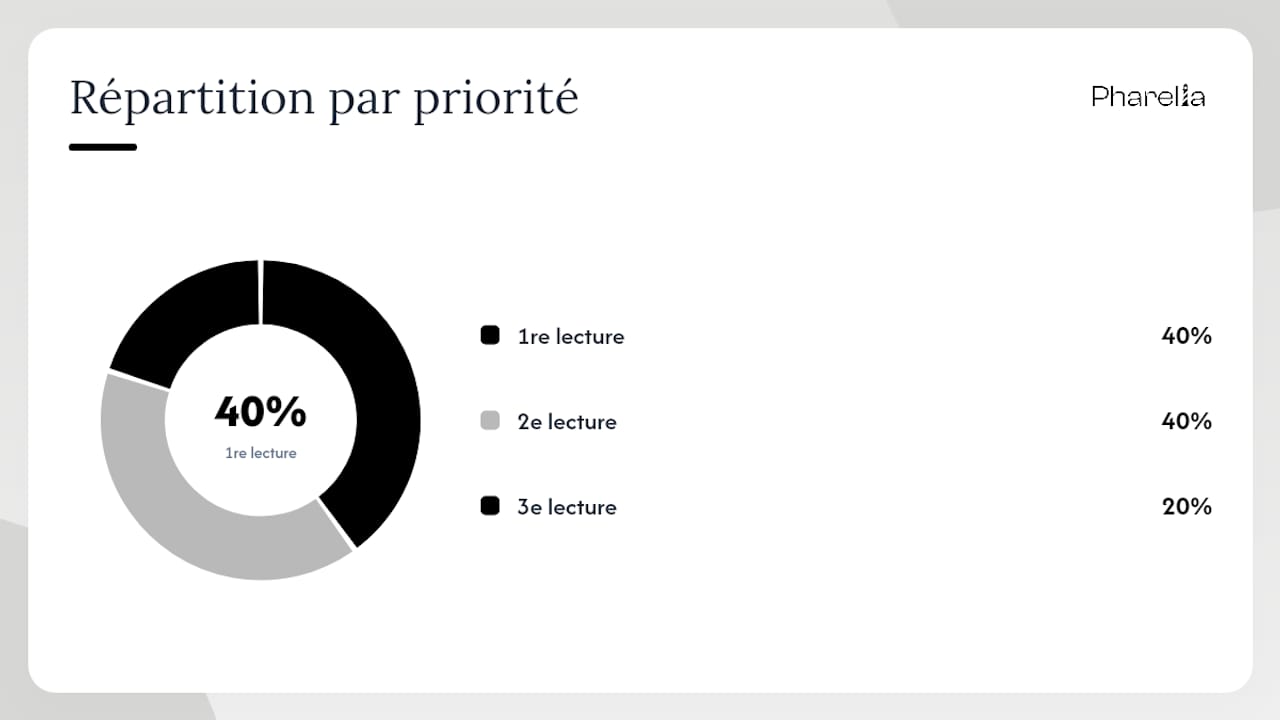
| Resource | Type | Priority |
|---|---|---|
| developers.google.com/consent | Technical documentation | 1st read |
| support.google.com/analytics | Product support | 1st read |
| EUR-Lex ePrivacy | Legal text | 2nd read |
| EDPB Guidelines 2023 | Guidelines | 2nd read |
| TagQueries / eegeek | French practical guides | 3rd read |
Frequently asked questions
Is Consent Mode v2 mandatory for French sites?
Yes, since March 2024, any site using Google Ads or GA4 with traffic from the EEA must implement Consent Mode v2 to retain full access to measurement and conversion features.
What is the difference between basic mode and advanced mode?
Basic mode completely blocks Google tags before consent; advanced mode loads them in a restricted state and sends cookieless pings to feed conversion modeling, at the cost of greater technical complexity.
Does Consent Mode v2 replace my CMP (Didomi, OneTrust, Cookiebot)?
No. Consent Mode is a technical signaling channel that transmits consent states to Google. Collection, storage and evidence of consent remain the responsibility of your CMP and organization.
How long does it take to see the impact on conversions?
The first effects on conversion reports are generally visible after 7 days, but a monitoring period of at least 14 days is recommended to distinguish Consent Mode's impact from natural traffic variation.
What happens if ad_user_data is not sent?
Enhanced Conversions and advertising audience lists do not work properly. Google cannot associate conversion data with users, degrading the quality of automated bidding signals in Google Ads.
Recommendation
- Privacy policy | Pharelia
- SEO & AI visibility for lawyers and law firms — Pharelia
- User-generated content: guide for microbusinesses/SMEs | Pharelia
- Hotjar or Microsoft Clarity: the guide for microbusinesses/SMEs | Pharelia