
Introduction

At a glance: - To optimize their search visibility, BigCommerce stores need to audit their Stencil theme, fix JSON-LD markup and submit their sitemap. These essential actions improve visibility through rich results and stronger technical SEO. Regular monitoring through Google Search Console and GA4 helps adjust the strategy for lasting, effective visibility.
Prioritise three actions before any other work on your BigCommerce store: audit the Stencil theme files, fix your product pages' JSON-LD markup, then submit your sitemap in Google Search Console. These three points account for most quick wins because many critical elements — canonicals, schema and indexing logic — depend on Stencil files rather than the admin interface. Complete product JSON-LD can increase click-through rates by 25 % to 40 % through rich results (price, availability, ratings). Pharelia offers a free visibility audit based on crawl, SERP and AI mention data to identify precisely where to act first.
Table of contents
- What are the 9 essential actions on BigCommerce?
- BigCommerce technical SEO: what does the Stencil theme actually control?
- Product pages: which JSON-LD should you inject to enable rich results?
- How should you structure content for SEO and AI visibility?
- How can you get a BigCommerce store cited by AI engines?
- Migration and launch checklist for a BigCommerce store
- How do you measure and demonstrate SEO ROI on BigCommerce?
- What timeframes and costs should a microbusiness/SME expect on BigCommerce?
- Key takeaways
- BigCommerce SEO is not a one-off project; it is ongoing work
- Pharelia supports BigCommerce stores, from audits to AI visibility
- Useful sources and technical documentation
- Frequently asked questions
What are the 9 essential actions on BigCommerce?
Here are the tasks to prioritise, ranked by impact and assigned owner:
- Audit the Stencil theme (developer): check
templates/layout/base.htmland product/category pages for missing or incorrect canonicals. - Fix product JSON-LD (developer): inject
Productschema directly into the Handlebars files, not through Script Manager. - Check canonicals and pagination (developer): ensure every paginated category URL points to the correct canonical page.
- Configure faceted navigation (developer): block filtered URLs in
robots.txtor canonicalize them to avoid diluting crawl budget. - Optimize titles and meta descriptions (business owner/writer): every product and category page must have a unique title under 60 characters, starting with the keyword.
- Enrich product pages (writer): 150 to 300-word descriptions, with GTIN/brand/MPN attributes completed in the BigCommerce admin.
- Configure Google Search Console and GA4 (business owner): submit the sitemap through
xmlsitemap.phpand enable e-commerce tracking in GA4. - Purge the Akamai cache after migration (developer): the CDN can retain obsolete 301 redirects for up to 48 hours.
- Set up AI mention tracking (business owner/agency): measure citations in ChatGPT, Perplexity and Google overviews.
Pro tip: After every JSON-LD change, open the page using ‘View Source’ in your browser. If the schema does not appear in the raw HTML, it is injected only through JavaScript and may be ignored by Googlebot on its first crawl. Then validate it with Google's Rich Results Test.
BigCommerce technical SEO: what does the Stencil theme actually control?
Stencil, BigCommerce's theme engine, uses Handlebars as its template language. It generates <link rel="canonical"> tags, JSON-LD blocks and the <head> structure for every page. The admin interface does not allow these elements to be changed directly: all fixes go through the theme files.

| Stencil file | SEO elements controlled | Common fix |
|---|---|---|
templates/layout/base.html | Global canonical, meta tags, hreflang | Add a dynamic canonical through a Handlebars helper |
templates/pages/product.html | Product JSON-LD, breadcrumb, H1 heading | Complete brand, GTIN, aggregateRating |
templates/pages/category.html | Category canonical, rel=next/prev pagination, FAQPage | Fix the canonical on paginated pages |
templates/pages/search.html | Noindex on internal search results | Add <meta name="robots" content="noindex"> |
Deployment always follows the same sequence: edit the file locally, test with stencil start, validate in View Source, then push with stencil push. Google recommends JSON-LD for structured data, and theme-level injection is more reliable than Script Manager, whose injections do not appear in the source HTML.
Regarding Akamai, BigCommerce's built-in CDN can cache 301 redirects for up to 48 hours after a URL migration. Plan a manual purge from the BigCommerce admin and monitor Google Search Console during the first two days.
Pro tip: Consult Pharelia's [technical SEO audit checklist](https://pharelia.com/en/resources/audit-seo-checklist) before opening the Stencil files: it lists checks in order of impact, avoiding fixes to minor details before major blockers are resolved.
Product pages: which JSON-LD should you inject to enable rich results?
Schema.org's Product schema must contain at least name, brand, sku, gtin or mpn, offers (with price, priceCurrency, availability), and aggregateRating. Cornerstone theme versions before 6.2.0 often omit brand, GTIN, MPN and aggregateRating by default.
Checks before deployment:
- Variants: for a product available in several sizes or colours, output an
AggregateOfferor anOfferfor each SKU. Incorrect variant mapping prevents eligibility for rich results. - Duplication: some BigCommerce apps inject their own Product schema through Script Manager, duplicating the theme schema. Check in View Source that there is only one Product JSON-LD block per page.
- Validation: Google's Rich Results Test, then Search Console (the Enhancements section) to monitor eligibility across the catalogue.
Deploying complete structured schema on product pages can increase click-through rates by 25 % to 40 % by displaying prices, availability and ratings directly in Google results.
Prioritise high-revenue product pages: the impact on click-through rates is immediate once Google validates eligibility, generally within two to four weeks of indexing.
How should you structure content for SEO and AI visibility?
A BigCommerce store's information architecture has three levels: product pages, category pages and editorial pages (guides, FAQs, comparisons). Product and category pages generate most transactional traffic; editorial pages capture informational queries and support citations in AI engines.
For categories, write 150 to 300-word descriptions that address buying intent: which products, for what use, and at what indicative price. Include keywords in the first sentences, as Google and AI answer systems read content that appears early in the HTML. Internal linking between categories, subcategories and product pages distributes authority and facilitates crawling.
Pro tip: Add a `FAQPage` JSON-LD block to the `category.html` template through a Handlebars partial. Two or three category-related questions and answers are enough to increase the chances of appearing in Google's AI overviews and rich snippets.
How can you get a BigCommerce store cited by AI engines?
The distinction between GEO (optimization for generative engines) and AEO (optimization for AI answers) is simple: GEO works on the geographical and authority signals that lead to your brand being cited; AEO structures content so it can be used directly in a generated answer. The two complement each other on BigCommerce.
- Expose Organisation and LocalBusiness structured data in
base.html: name, address, phone number, URL and industry. - Structure FAQs and practical guides on category and editorial pages, with concise answers of two to four sentences.
- Ensure content is server-rendered: excerpts used by AI must appear in the source HTML, not only in the JavaScript DOM.
- Produce authoritative content suitable for citation: numerical data, named sources and standalone excerpts answering a specific question without additional context.
- Measure AI mentions: simulate queries in ChatGPT and Perplexity, then track citations with a dedicated monitoring tool alongside Google Search Console and GA4.
Visibility in AI engines relies on the same foundations as conventional SEO: a well-indexed website, valid structured data and authoritative content.
Migration and launch checklist for a BigCommerce store
Pre-launch:
- Inventory all existing URLs and prepare the 301 redirect plan.
- Test canonicals on product, category and pagination pages.
- Validate JSON-LD with Rich Results Test in a staging environment.
- Back up theme files before any deployment.
- Check that
robots.txtblocks checkout and customer account URLs.
Launch:
- Purge the Akamai cache from the BigCommerce admin immediately after going live.
- Submit the sitemap (
xmlsitemap.php) in Google Search Console. - Monitor 4xx and 5xx errors in GSC during the first 48 hours.
- Check index coverage and any redirect loops.
Post-launch (days 1 to 30):
- Monitor crawling with a dedicated tool (Screaming Frog or equivalent).
- Check Core Web Vitals in GSC and fix pages that fall short of thresholds.
- Validate rich results in Search Console's Enhancements section.
- Prepare a rollback plan if a major anomaly is detected (traffic falling by more than 30 % in 48 hours).
How do you measure and demonstrate SEO ROI on BigCommerce?
The tools to configure first: Google Search Console for indexing and rankings, GA4 with e-commerce tracking enabled for organic revenue, and an AI mention tracking tool to measure visibility in generated answers. Industry comparisons are available for more detail on selecting analytics tools.
KPIs to track every month:
- Organic traffic on product and category pages (GSC + GA4).
- Conversion rate and revenue from the organic channel (GA4, e-commerce report).
- The number of pages eligible for rich results and their actual display rate (GSC, Enhancements).
- Brand mentions in AI answers (manual tracking or a dedicated tool).
- Average rankings on target queries (GSC, rank tracking tool).
The monthly report template has four parts: initial indicator values, actions taken during the month, changes in each KPI, and recommendations for the following month. To attribute e-commerce conversions to organic traffic in GA4, configure a conversion funnel with source/medium organic/google as the segment filter. Pharelia's SEO tracking guide explains GA4 configuration for online stores.
What timeframes and costs should a microbusiness/SME expect on BigCommerce?
| Phase | Indicative duration | Cost range |
|---|---|---|
| Stencil technical audit | 1 to 2 weeks | 500 € |
| Theme fixes (canonical, JSON-LD, pagination) | 2 to 6 weeks | — |
| Migration with 301 redirects | 1 to 3 weeks | — |
| Monthly support (content + monitoring + reporting) | Ongoing | 500 €/month |
| Initial content strategy (3 to 6 months) | 3 to 6 months | Included in the monthly package |
The recommendation for a microbusiness/SME: start with the audit (limited cost, a clear deliverable), then undertake technical fixes in batches according to the identified priorities. A monthly package takes over for content production and indicator monitoring. Timeframes increase if the theme has been heavily customised or the migration involves several thousand URLs.
Key takeaways
SEO for a BigCommerce store rests on three non-negotiable pillars: technical control of the Stencil theme, complete product JSON-LD markup, and continuous measurement through Google Search Console and GA4.
| Point | Details |
|---|---|
| Prioritise the Stencil theme | 70 % of critical SEO elements depend on Handlebars files, not the admin. |
| Complete product JSON-LD | Include brand, GTIN, MPN and aggregateRating to enable rich results and increase click-through rates by 25 % to 40 %. |
| Canonicals and pagination | Fix canonicals on paginated categories and block filtered URLs in robots.txt. |
| Configured GSC and GA4 | Submit the sitemap, enable GA4 e-commerce tracking and monitor Enhancements monthly. |
| AI visibility (GEO/AEO) | Expose Organisation JSON-LD, structure FAQs and check that content is server-rendered. |
| Pharelia | A free visibility audit (crawl + SERP + AI mentions) as the starting point before any corrective engagement. |
BigCommerce SEO is not a one-off project; it is ongoing work
The most common mistake among microbusiness/SME owners is treating SEO as a box to tick before launch, then never touching it again. BigCommerce evolves (Cornerstone updates, new Schema.org rules, algorithm changes), and AI engines change their citation criteria several times a year. Poorly planned architecture costs two to three times more to fix later than to design correctly from the outset.
A hybrid approach remains the most effective: the BigCommerce admin for everyday metadata and description management, a technical expert for Stencil files, and an agency for editorial strategy and AI mention tracking. Separating these three responsibilities without coordinating them produces inconsistencies: JSON-LD fixed in the theme but overwritten by a third-party app, or optimized content on pages Google does not crawl because the canonical is incorrect.
Modern e-commerce SEO requires optimizing simultaneously for conventional search and AI answer systems. Both surfaces draw on the same foundations: well-indexed pages, valid structured data and authoritative content. Addressing one without the other leaves visibility untapped.
Pharelia supports BigCommerce stores, from audits to AI visibility
Pharelia is the visibility agency for BigCommerce retailers who want a practical action plan, not an 80-page report. The engagement starts with a free visibility audit based on your store's crawl, SERP and AI mention data: you receive a prioritised diagnosis of technical obstacles, content opportunities and your presence in AI answers.
Services cover the Stencil technical audit, JSON-LD implementation, content and internal linking strategy, GA4/GSC monitoring and monthly reporting. For stores wanting to go further, the offering includes visibility in AI engines (ChatGPT, Perplexity, Gemini) and citation measurement. Applewood achieved +300 % in SEO and +500 % in AI visibility with this methodology.
Contact us on pharelia.com/secteurs/e-commerce to get started.
Useful sources and technical documentation
- Introduction to BigCommerce SEO: native features (optimized URLs, microdata, 301 redirects, CDN).
- SEO fields in the BigCommerce admin: where to enter titles, meta descriptions and keywords for each page type.
- Google verification and sitemap submission: the complete Google Search Console procedure.
- Sitemap location and format: XML format, a limit of 50 000 URLs per file, multichannel submission.
- Rich Results Test (Google): validate JSON-LD before deployment.
- Product JSON-LD guide for BigCommerce: missing Cornerstone fields and variant management.
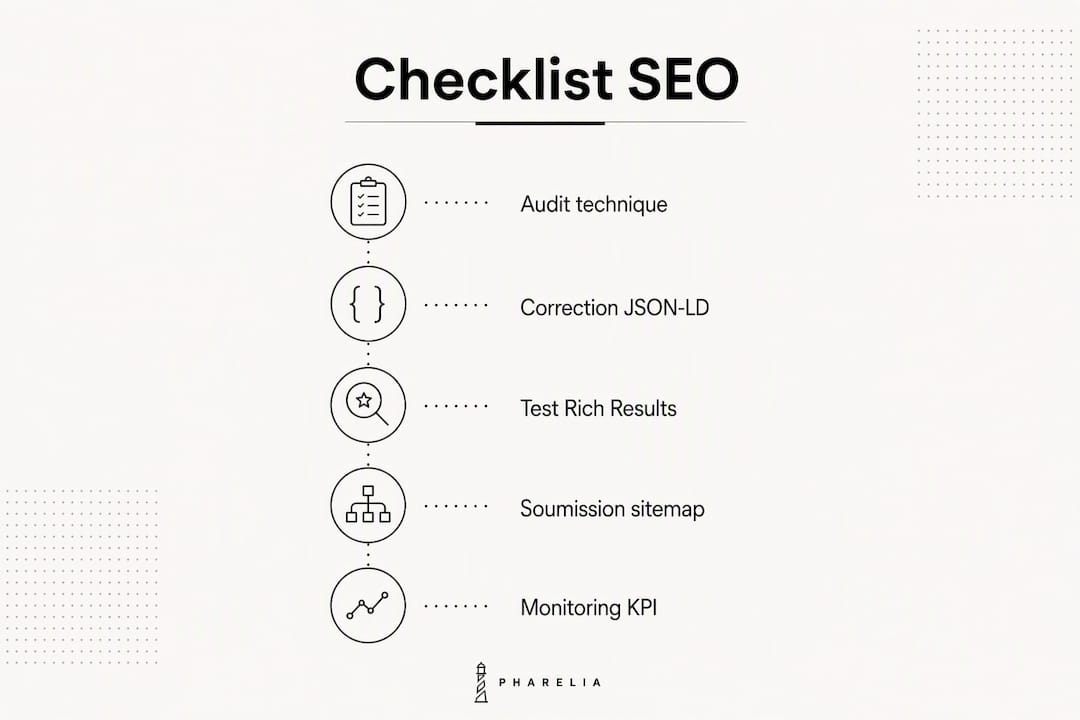
Recommended reading order: Stencil theme audit → JSON-LD fixes → Rich Results tests → sitemap submission → GSC monitoring.
Frequently asked questions
How do you submit a BigCommerce sitemap to Google?
In Google Search Console, add xmlsitemap.php after your domain (e.g. votredomaine.com/xmlsitemap.php). BigCommerce generates and updates this file automatically.
Why does JSON-LD not appear in View Source?
The schema is probably injected through Script Manager, which does not write into the source HTML. Move the injection to the Stencil theme's Handlebars files to ensure Googlebot can see it.
Which JSON-LD fields are essential for product rich results?
name, brand, sku or gtin, offers (with price, priceCurrency, availability) and aggregateRating. The default Cornerstone theme often omits brand, GTIN and aggregateRating.
How long does it take to see SEO results on BigCommerce?
Technical fixes (canonical, JSON-LD) produce visible effects in GSC within two to six weeks. Content-driven organic traffic gains consolidate over three to six months.
Can Pharelia work on an existing BigCommerce store?
Yes. Pharelia publishes directly into BigCommerce and handles the Stencil technical audit, JSON-LD, content strategy and AI mention tracking without requiring a platform migration.