
 Add to preferred sources on Google
 ChatGPT
 Claude
 Perplexity

Introduction
Technical SEO consulting is worth paying for when your pages cannot be reliably crawled, rendered or indexed, and when someone is also accountable for getting the fixes shipped and checked. A report of 200 flagged issues is not the product. The product is a short, ranked list of changes that your developers can ship, followed by proof that search engines picked them up. Our analysis: the engagements that disappoint are the ones scoped as an audit with no owner for implementation and validation.
This guide is for B2B marketing and SEO leaders, SaaS and software teams, professional services and industrial firms, multi-site organizations and ecommerce teams. It explains what a technical SEO consultant does, which problems justify the spend, how an engagement should run, and how to score the findings yourself before you sign anything.
TL;DR
- Technical SEO consulting fixes the infrastructure that decides whether search engines can crawl, render, index and serve your pages. It does not replace content or authority work.
- Buy it when you see specific symptoms: pages stuck outside the index, traffic drops after a migration, JavaScript content that does not show up, or several sites with inconsistent structure.
- Judge a proposal on four things: diagnosis tied to your stack, a ranked backlog, named owners for implementation, and a validation step with agreed measures.
- Separate vendor claims from verified fact. Rankings and AI citations cannot be guaranteed by anyone, and a good proposal says so.
- Our free single-page audit is a quick way to see what a page looks like to a crawler before you brief anyone.
What technical SEO consulting actually covers
Technical SEO is the work of optimizing site infrastructure so search engines can crawl, render, index and serve your content efficiently. That is the definition used in Search Engine Land’s guide to technical SEO, and it is a useful boundary. If the question is “can a search engine reach, understand and store this page?”, it is technical. If the question is “is this page persuasive or authoritative?”, it is not.
That boundary also answers a common question: is technical SEO the same as on-page SEO? No. Search Engine Land’s on-page guide separates three types. On-page covers content quality, keyword targeting and user experience. Off-page covers external authority signals. Technical covers site infrastructure and crawlability, and it usually involves developers. HubSpot’s technical SEO guide makes the practical point: a misconfigured canonical tag or a blocking robots.txt rule can defeat pages that are otherwise well written and well linked.
A consultant’s work typically falls into these areas:
- Crawlability and indexation. Robots.txt rules, XML sitemaps, canonical tags, redirects, status codes, and the pages Search Console reports as discovered or crawled but not indexed.
- Rendering. Whether content that depends on JavaScript is present in the HTML that Google actually processes.
- Site architecture and internal linking. How deep important pages sit, how authority flows to them, and how duplicates are controlled.
- Performance. Loading, responsiveness and visual stability, measured on real user data.
- International and multilingual setup. Language and region targeting, URL structure and alternate-language annotations across markets.
- Structured data and templates. Markup that matches visible content, applied at template level rather than page by page.
- Change management. Guardrails around migrations, redesigns, URL changes and deployments, so traffic is not lost by accident.
Symptoms that justify hiring help
Not every site needs a technical consultant. Google’s own crawl budget guide says that if your site does not have a large number of rapidly changing pages, or if pages are crawled the same day they are published, you do not need to read the advanced guidance. Its stated audience is sites with more than a million unique pages that change weekly, or sites with 10,000 or more pages that change daily, plus sites with many URLs classified as discovered but not indexed. A 150-page B2B software site rarely has a crawl budget problem, whatever a vendor deck suggests.
What does justify the spend is a concrete symptom with a plausible technical cause. Here is a diagnostic list we would use as a first filter:
| Symptom | Likely technical cause | What to ask a consultant to verify |
|---|---|---|
| Key pages missing from the index | Noindex tags, canonicals pointing elsewhere, blocked resources, thin or duplicate templates | Page Indexing report, canonical selected by Google versus declared |
| Traffic drop after a redesign or migration | Broken redirect mappings, changed URLs, lost internal links | Redirect map against old URL list, server logs, before/after crawl |
| Product or content pages load blank without JavaScript | Client-side rendering, content injected late | Rendered HTML versus raw HTML for a sample of templates |
| Several brand sites cannibalize each other | Overlapping templates, inconsistent hreflang or canonicals | Cross-site URL inventory and ownership of each topic |
| Ecommerce category pages multiply into thousands of URLs | Faceted navigation and parameters | Which parameter URLs are crawlable and indexable |
| Slow or unstable pages on real devices | Heavy scripts, unsized images, third-party tags | Field data, not only lab tests |
If none of these rows describes you, start with content and internal linking before buying a technical engagement.
Rendering: the issue B2B teams most often underestimate
SaaS and technical B2B sites are frequently built on JavaScript frameworks, and that is where many silent indexing failures begin. Google’s JavaScript SEO documentation explains that pages go through crawling, rendering and indexing, and that Google can only see content that is visible in the rendered HTML. If your pricing details, product descriptions or comparison tables appear only after a script runs that fails or is blocked, they may not be indexed as you expect.
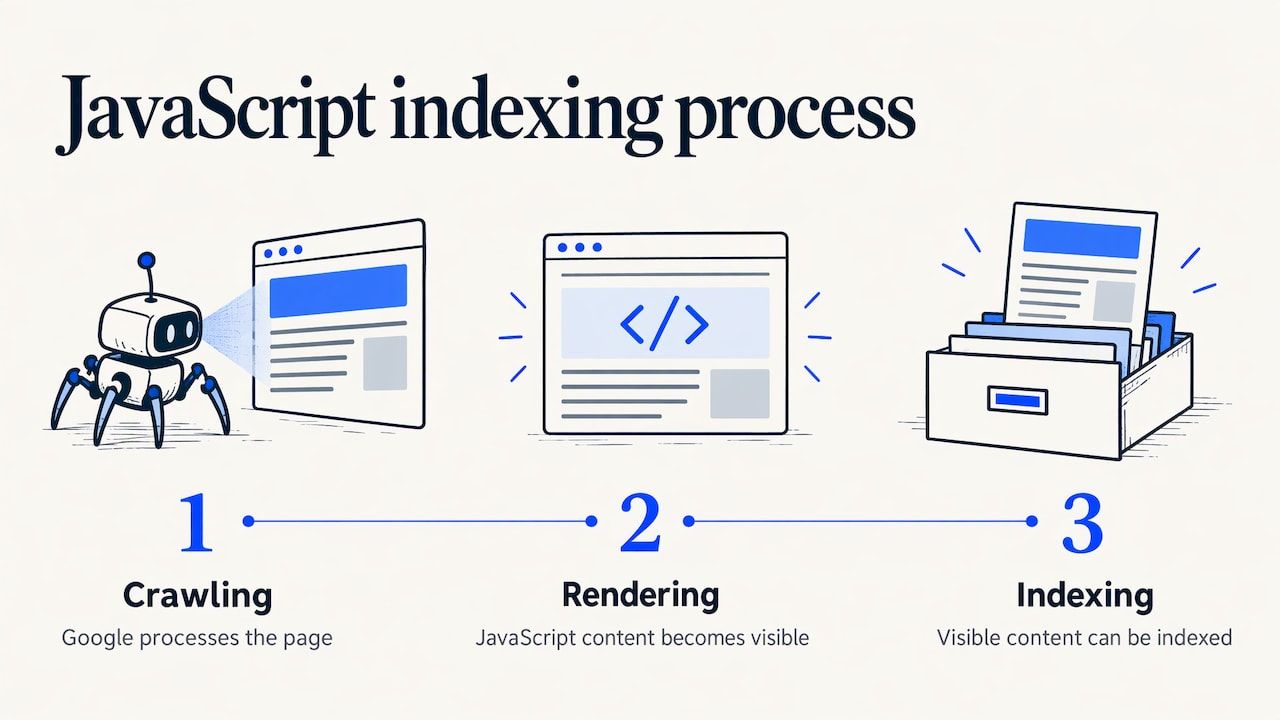
A simple reproducible check you can run today: open a key page, view the raw source, and search for a distinctive sentence from the visible page. If it is not in the source, test the rendered version with the URL Inspection tool in Search Console. If the sentence appears only after rendering, you have a dependency on rendering that deserves a developer’s attention. Our JavaScript SEO guide goes deeper on rendering options and how to test them.
This is also a good example of why technical consulting is a delivery problem, not a reading problem. The diagnosis takes hours. The fix may involve server-side rendering, template changes and a release cycle, and someone has to confirm afterward that the change reached the index.
Performance: know the thresholds before you argue about them
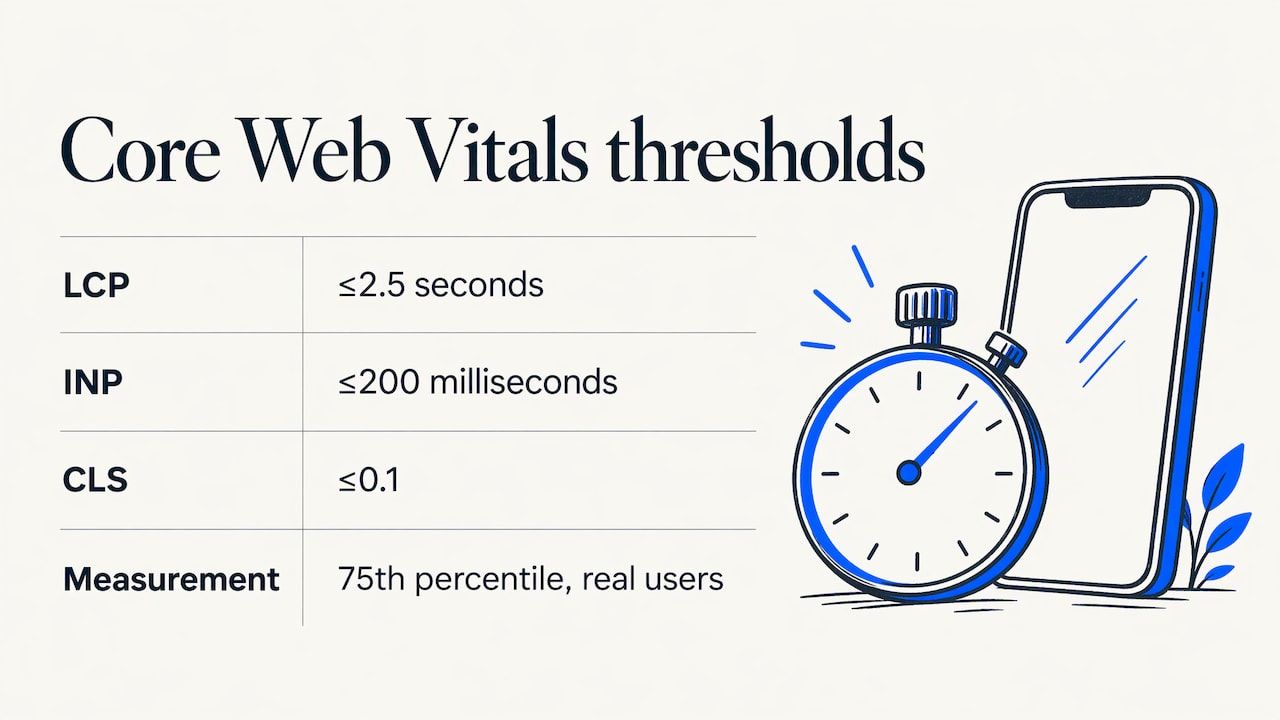
Speed is the topic most prone to vendor theater, so anchor it to published thresholds. According to web.dev’s Core Web Vitals documentation, a good experience means Largest Contentful Paint within 2.5 seconds, Interaction to Next Paint of 200 milliseconds or less, and Cumulative Layout Shift of 0.1 or less, measured at the 75th percentile of real users.
Two practical consequences follow. First, ask for field data (what real visitors experience) rather than a single lab score from a developer’s laptop. Second, treat performance as one input among several. Our position, stated as opinion: a site with indexing or rendering failures should fix those before polishing a metric that is already passing.
How a technical SEO engagement should run
Whatever the provider, a sound engagement follows the same arc. Here is the sequence we consider the reasonable standard, with where it tends to go wrong.
- Scoping. Agree the goal, the sites and markets in scope, the CMS and stack, who has access to Search Console, analytics, the CMS and the codebase, and who in your team approves changes. It goes wrong when scope is a vague “full audit”.
- Diagnosis. Crawl the site, compare against Search Console data and, where available, server logs, and sample the templates. It goes wrong when findings are generic and could describe any website.
- Prioritization. Rank issues by expected impact, effort and risk, grouped by template or root cause. It goes wrong when the output is a flat spreadsheet of hundreds of rows.
- Implementation. Developers or the CMS owner ship the changes, with tickets that include the reason, the exact change and an acceptance test. It goes wrong when no one owns the ticket queue.
- Validation. Re-crawl, check that Google selected the intended canonicals, confirm indexation and watch for regressions. It goes wrong when the engagement ends at the report.
- Monitoring. Keep guardrails around redirects, URL changes and deployments so the next release does not undo the work.
One piece of third-party guidance is worth noting as a heuristic, not a fact: a provider with a clear onboarding process typically starts with a technical and strategic review in the first weeks. Use it as a question to ask, not as proof of quality.
A scoring method you can use before you hire anyone
If you have a list of issues from a crawler or a previous audit, you can rank them yourself in an hour. Score each issue from 1 to 5 on three criteria, then compute a priority number.
- Reach: how many revenue-relevant pages the issue touches (5 means a template used on all product or solution pages).
- Severity: how directly it blocks crawling, rendering or indexing (5 means pages cannot be indexed at all).
- Effort and risk: how hard it is to ship safely (5 means a major release with migration risk).
Priority = (Reach × Severity) ÷ Effort.
Here is an illustrative example. The figures below are invented to show the arithmetic, not measured from any real site.
| Issue (illustrative) | Reach | Severity | Effort | Priority |
|---|---|---|---|---|
| Canonical tags on solution-page template point to the homepage | 5 | 5 | 2 | 12.5 |
| Product comparison table rendered only by client-side script | 4 | 4 | 3 | 5.3 |
| Parameter URLs from filters crawlable and indexable | 3 | 3 | 3 | 3.0 |
| Missing alt text on blog images | 2 | 1 | 1 | 2.0 |
| Large hero image slows loading on blog pages | 2 | 2 | 2 | 2.0 |
The lesson is not the exact numbers. A template-level canonical error outranks cosmetic fixes by a wide margin, and a consultant who leads with the bottom of this table is selling volume rather than diagnosis. A good proposal shows this kind of reasoning, and you can use the same sheet to hold any provider accountable for how it ranks work.
Choosing the engagement type
Three engagement shapes cover most needs. Pick by what your team can already do, not by the provider’s preferred product.
| Your situation | Engagement shape that fits | Who owns what |
|---|---|---|
| Strong in-house developers and writers, unclear priorities | Diagnosis and prioritization, with validation after release | Provider ranks and checks; your team ships |
| Developers are stretched, content and SEO are also thin | Managed engagement covering diagnosis, tickets, content and measurement | Shared in a written scope; provider coordinates |
| Migration, redesign or multi-site consolidation | Project engagement with a redirect plan, pre-launch checks and post-launch monitoring | Defined per phase with a go-live checklist |
If you are planning a redesign, read our guides on preserving rankings in a SEO website redesign and on building an SEO redirect plan first. Most traffic losses we would class as avoidable come from redirect mapping and template decisions made late.
Multi-brand organizations have a further question: what is shared and what is local. Hreflang, canonical rules, URL patterns and internal linking should be designed once and applied across sites. See our guides to multilingual SEO and to scoping multilingual SEO services. For ecommerce teams, the practical sequence is in our 30/90/180-day ecommerce SEO roadmap, and platform specifics are covered for Webflow and BigCommerce.
What a good proposal contains
Use this as a decision matrix when you compare proposals. Each line is a yes or no.
- Does it name the sites, markets, languages and platforms in scope?
- Does it say who gets access to Search Console, analytics, the CMS and the code, and who approves releases?
- Does it describe deliverables as a ranked backlog and tickets, not only a report?
- Does it define how fixes are validated and what counts as done?
- Does it separate what the provider does from what your developers do?
- Does it describe measurement honestly: indexation, crawl behavior, impressions, clicks, visits, enquiries and revenue as different layers?
- Does it avoid guaranteeing rankings, traffic or AI citations?
The last two lines matter more than they look. Search visibility is a chain: a page is crawled, indexed, ranked, clicked, and only then does it lead to an enquiry. If AI answer engines are in scope, mentions, citations, clicks and visits are different events and should be reported separately. A provider that merges them into one “visibility” number is hiding which link in the chain moved.
Vendor claims versus evidence
The first page of results for this topic is mostly agency roundups and service pages. They are useful for seeing what providers say they do, but a ranked list published by a company that also sells services is a vendor claim, not a test. Treat lines such as impact percentages on service pages as marketing unless the page states the sample, the period and the method. In our analysis, the strongest evidence you can ask for is a before-and-after record on a comparable site: the issue found, the change shipped, the date, and the indexation or crawl data afterward. Even that shows association, not a guarantee that your site will respond the same way.
Where Pharelia fits
Pharelia runs technical and international SEO inside a coordinated, managed engagement, alongside strategy, content production, optimization and measurement. Scope is tailored after an initial scoping step, and the proposal defines the work, deliverables, responsibilities, languages, cadence, access and budget. Pricing is available on request. If you want to see what that looks like for your stack, start with our technical and international SEO service or the broader managed SEO and GEO services.
Our view on technical SEO consulting We think technical SEO is most valuable when it is connected to the rest of the visibility system. A fixed canonical rule is worth little if the pages it protects say nothing useful, and a strong article is wasted if the template around it cannot be indexed. That is why we treat strategy, production, optimization, technical work and measurement as one coordinated service rather than separate purchases. Our opinion, not a measured result: the most expensive mistake in this field is an audit that nobody owns. We would rather agree up front who ships each change, how we will confirm it worked, and which measures count, than hand over a long list and leave. We do not guarantee rankings or citations, and we say so in the proposal conversation. The same logic applies to AI answer engines. Pages that cannot be crawled, rendered and understood are hard to surface anywhere, so technical hygiene is a precondition for both Google and AI visibility work. Louis Choquet
Check one page before you brief anyone
Before you write a brief, it helps to see one important page the way a crawler does. Our free SEO/GEO audit automatically assesses a single public page, with no account and no mandatory email. The report gives findings, scores and limitations, and stays available for seven days. It is not a complete website audit, it does not fix anything, and it does not measure actual AI citations, but it gives you a concrete starting point for the conversation about scope. Pick your highest-value solution or product page and use the findings to test your assumptions against the symptom table above.
FAQ
What does a technical SEO consultant do?
A technical SEO consultant diagnoses why search engines may not crawl, render, index or serve your pages as intended, then ranks the fixes and checks that they work after release. The scope usually covers indexation, site architecture, redirects, rendering, performance and international setup. The best engagements also name who implements each change.
Is technical SEO the same as on-page SEO?
No. On-page SEO concerns content quality, keyword targeting and user experience on each page, while technical SEO concerns the infrastructure that lets search engines access and understand those pages. They overlap at templates and internal links, but the skills and owners are usually different, with developers central to technical work.
When is technical SEO consulting not necessary?
If your site is small, pages are indexed soon after publishing and Search Console shows no major indexing problems, content and internal linking will usually matter more. Google’s own crawl budget guidance says most sites without large, fast-changing page counts do not need its advanced recommendations. Revisit the question after a redesign, migration or platform change.
Can AI tools do technical SEO for me?
AI tools can speed up crawling analysis, summarize logs and draft tickets, but they cannot decide which template change is safe to ship or confirm that Google indexed it. The judgment, the access to your systems and the validation still need an accountable person. Treat AI output as a draft that a specialist checks.
How should I measure whether technical SEO worked?
Measure in layers: indexation and crawl data first, then impressions and clicks, then visits, enquiries and revenue. Technical fixes often show up in the first two layers before they reach the last. Agree the measures and the reporting period before work starts, and do not expect a guaranteed outcome.
Sources
- What Is Technical SEO? The Definitive Guide, Search Engine Land
- What Is On-Page SEO? Key Elements & Best Practices, Search Engine Land
- Understanding technical SEO: Audit fundamentals, HubSpot
- Crawl Budget Management, Google Search Central
- Understand JavaScript SEO Basics, Google Search Central
- Web Vitals, web.dev