# SEO rank tracking: a method for managing Google performance in 2026
Master SEO rank tracking in 2026: choose your keywords, set a tracking schedule, and trigger strategic actions.
Author: Louis Choquet · Founder, Pharelia
Published on 2026-08-17 · Updated on 2026-08-17
Source: https://pharelia.com/en/resources/suivi-positions-seo
## Introduction

SEO rank tracking takes three decisions, not thirty. Choose a focused list of priority keywords for a small business or SME, set an appropriate tracking schedule (weekly in most cases, daily during active optimization or just after a Google algorithm update), and define alert thresholds that trigger action rather than passive observation. This structure, rather than your choice of tool, determines whether tracking produces decisions or just tables of figures.
Here is the checklist to get started in less than a day:
- List priority keywords based on the pages with the greatest revenue potential, not the most visited pages.
- Segment each keyword by intent (informational, transactional, local) and device (mobile, desktop).
- Connect Google Search Console to your account and check that data is coming through for your property.
- Choose a tracking schedule that fits your activity: weekly for routine operations, daily during testing.
- Set a simple alert rule: a loss of more than 5 positions on a strategic keyword triggers a check within 48 hours.
- Assign someone to review alerts, even in a team of one.
For most organizations, weekly checks are enough to detect trends without overwhelming the team with daily fluctuations that often have no statistical significance. Reserve daily tracking for sensitive periods: a technical redesign, a batch of new content, or the weeks following a major Google update.
## Key takeaways
SEO rank tracking works when it combines a focused list of priority keywords, a schedule suited to your activity, and alert thresholds that trigger action.
| Point | Details |
| --- | --- |
| Prioritize your scope | Track 30 keywords with high commercial value rather than an unfocused, exhaustive list. |
| Cross-reference metrics | Never assess a ranking in isolation: combine it with impressions, CTR, and actual traffic. |
| Set clear alert thresholds | A precise action rule is worth more than a dashboard viewed without a decision-making protocol. |
| Complement Google Search Console | Its 16-month history and average positions limit detailed analysis of sudden changes. |
| Consider dedicated support | Pharelia offers a free audit, followed by a complete tracking, reporting, and ongoing optimization process. |
## Table of contents
- [Why small businesses and startups benefit from tracking SEO rankings](#pourquoi-une-tpe-ou-une-startup-a-interet-a-suivre-ses-positions-seo)
- [Which metrics to track and how to read them](#quels-indicateurs-suivre-et-comment-les-lire)
- [Which type of tool to choose for your situation](#quelle-famille-doutils-choisir-selon-votre-situation)
- [How to set up your tracking in practice](#comment-parametrer-concretement-votre-suivi)
- [What to do when rankings fall: diagnosis and prioritization](#que-faire-face-a-une-chute-de-positions-diagnostic-et-priorisation)
- [Build reporting that triggers decisions, not just reading](#construire-un-reporting-qui-declenche-des-decisions-pas-seulement-des-lectures)
- [An example of a usable dashboard in 4 weeks](#un-exemple-de-dashboard-exploitable-en-4-semaines)
- [What it costs and when to expect results](#combien-ca-coute-et-quand-attendre-des-resultats)
- [What to remember before getting started](#ce-quil-faut-retenir-avant-de-vous-lancer)
- [What I learned from observing dozens of misused SEO dashboards](#ce-que-jai-appris-en-observant-des-dizaines-de-dashboards-seo-mal-utilises)
- [If you prefer to delegate setup and tracking](#si-vous-preferez-deleguer-la-mise-en-place-et-le-suivi)
- [Sources](#sources)
- [Frequently asked questions](#questions-frequentes)
## Why small businesses and startups benefit from tracking SEO rankings
Moving from the third results page to the first changes nothing in revenue if nobody clicks. This is where rank tracking becomes meaningful: it is about linking a ranking change to a measurable effect on qualified traffic and, ultimately, inbound enquiries, rather than collecting figures.
Three practical uses alone justify the time investment:
- **Spot a long-tail opportunity**: a keyword ranking on page 2 with modest search volume can offer a quick win if targeted content moves it onto the first page.
- **Detect cannibalization**: two pages on the same site competing for the same query often end up weakening each other in the results, a phenomenon invisible without comparing page performance.
- **Check the actual effect of optimization**: rewriting a title tag or expanding content is worth repeating only if tracking confirms a ranking gain in the following weeks.
A local business tracking its ranking for “plumber [ville]” will immediately see whether a new Google Business Profile listing or blog content influences its local ranking. A SaaS publisher will instead monitor comparison or feature queries, where purchase decisions take place. A consulting firm benefits most from tracking niche queries with low volume but strong intent, often overlooked in favor of overly competitive generic keywords. In all three cases, tracking turns an SEO intuition into quantitative evidence.
## Which metrics to track and how to read them
Average position is the most viewed and most misinterpreted metric. An average can hide a binary reality: a keyword fluctuating between position 3 and position 9 will show an average of 6, a figure that does not reflect actual clicking behavior. That is why rankings should always be cross-referenced with at least three other signals.
**Metrics to monitor first:**
- **Absolute position**: the exact rank at a given moment, useful for a single high-value keyword.
- **Average position**: an aggregate over a period, to be interpreted cautiously for keywords with frequent fluctuations.
- **Impressions**: the number of times your page appears in the results, often a more reliable signal than ranking alone for measuring actual visibility.
- **Click-through rate (CTR)**: the ratio of clicks to impressions, revealing whether your title and meta description turn exposure into visits.
- **Visibility or Share of Voice**: a weighted score reflecting your presence across a set of strategic keywords rather than just one.
- **Ranking pages**: the list of URLs that actually capture traffic, essential for spotting winning pages and those losing momentum.
A specialist guide to [SEO rank tracking](https://hacktheseo.com/fr/suivi-positionnement-seo-guide/) also recommends managing your strategy through weighted visibility rather than average position alone, precisely because an overall score smooths short-term fluctuations and better reflects the underlying trend.
**Pro tip:** *never judge an SEO action on a single week of data. Always compare a 30-day window before and after an optimization to neutralize the natural statistical noise in SERPs.*
Segmentation by device and location often changes the diagnosis. A page can dominate mobile results while being absent on desktop, or vice versa, because of rich results (featured snippets, local maps) that appear only on one device type. Ignoring this segmentation means making decisions blindly for half your actual audience.
You should also keep a structural limitation in mind: Google Search Console retains only 16 months of history and reports positions as averages, making detailed analysis of a sudden change on a specific day difficult. This is one reason many marketing teams complement the native tool with a dedicated tracking solution.
## Which type of tool to choose for your situation
There are three main types of Google rank tracking tools, each with its own data approach and natural use case. The choice depends on your scale, budget, and need for historical detail, rather than the brand.
**Tools built around Google Search Console** use Google's official data directly. They are free and reliable for impression and click volumes, but limited by the 16-month history and aggregation into averages rather than point-in-time measurements. A [detailed analysis of Google rank tracking](https://seopilote.fr/blog/comment-suivre-positions-google) emphasizes that Search Console is essential but insufficient on its own: it does not automatically detect cannibalization without manually cross-referencing data by URL.
**Dedicated SaaS tracking solutions** take regular measurements, often daily, by querying search results pages directly. They offer longer histories, configurable alerts, and detailed segmentation by device, country, or city. A [rank tracking platform](https://visiboard.fr/outils/suivi-positions) illustrates this approach with daily tracking, history retained according to the subscribed plan, and segmentation that clearly distinguishes mobile from desktop trends.
**Hybrid tools connected to the Search Console API** combine the reliability of Google data with an enhanced tracking interface. A solution such as [Horusium](https://www.horusium.com/fonctionnalites/suivi-mots-cles/) lets you favorite strategic queries and cross-reference clicks, impressions, and CTR across periods, without relying solely on SERP scraping.
| Tool type | Data frequency | Typical cost | Best use case |
| --- | --- | --- | --- |
| Google Search Console alone | Aggregated data, 16-month history | Free | New site, no budget, first steps |
| Dedicated tracking SaaS | Daily or weekly measurements | Monthly subscription varying with keyword volume | Mature site, active competitor monitoring |
| Hybrid API + dashboard solution | Continuously enriched Google data | Monthly subscription, often adjustable | Multiple countries, structured marketing teams |
For a site just starting out, Search Console is more than sufficient for the first few months. A mature site with several dozen strategic pages benefits from investing in dedicated tracking once keyword volume exceeds what manual review can handle each week. A local business with multiple locations should prioritize a tool that segments by city; otherwise, national averages hide stark performance differences between branches.
## How to set up your tracking in practice
Solid tracking setup follows a logical sequence. Skipping a step, especially prioritization, is the most common reason dashboards are abandoned after three weeks.
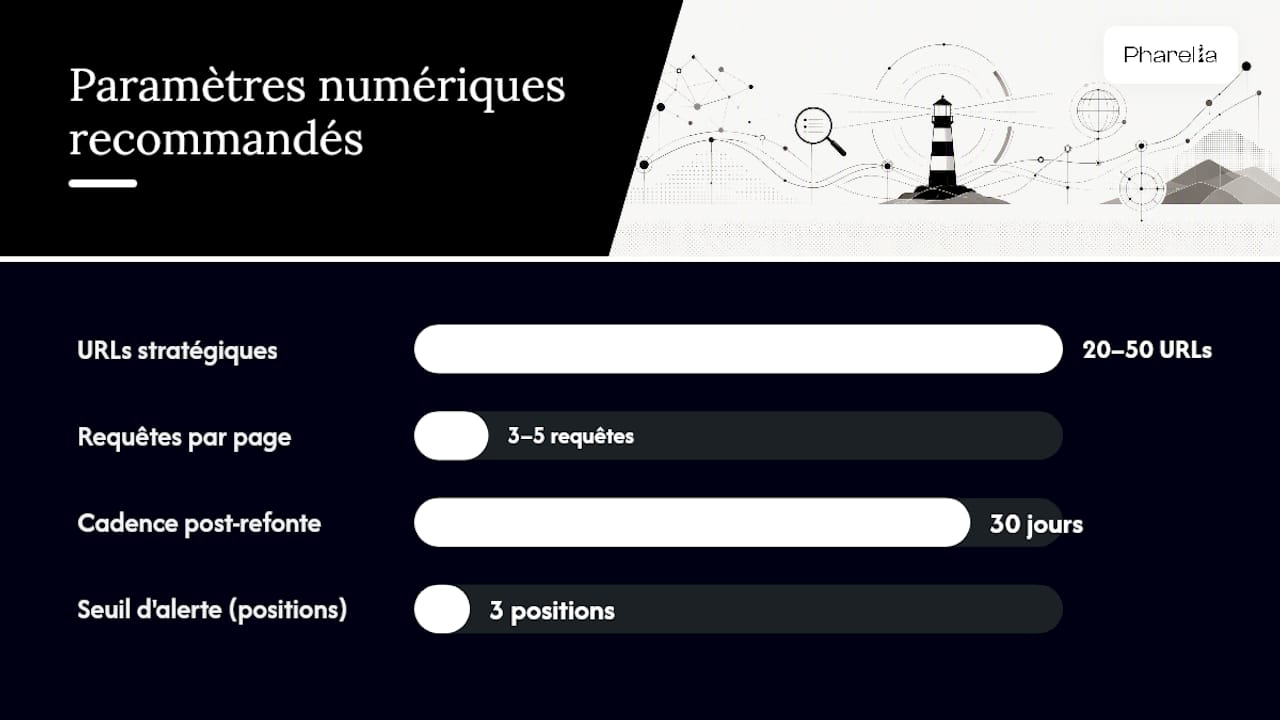
1. **Inventory your strategic pages**: identify the 20 to 50 URLs that generate or could generate the most commercial value, not just the most traffic.
2. **Associate each page with its target keywords**: avoid tracking more than three to five queries per page, or you risk spreading attention across variations with little real value.
3. **Tag by segment**: search intent, device, and geographic area. This step determines the quality of all your future analyses.
4. **Choose your schedule**: weekly by default, daily during the 30 days following a redesign or major content update.
5. **Connect your data sources**: the Search Console API remains the reference for reliability, supplemented if needed by a Looker Studio export to automate visual reporting.
6. **Define roles**: who reviews alerts, who decides on corrective actions, and within what timeframe. In a small organization, this can be one person, but the role must be explicit.
**Pro tip:** *set alert thresholds as a percentage change in position rather than an absolute value. Losing 3 positions on a keyword ranked 4th is a strong signal; the same loss on a keyword ranked 45th does not warrant the same urgency.*
These thresholds prevent both excessive, unnecessary notifications and silence in the face of real deterioration.
## What to do when rankings fall: diagnosis and prioritization
A ranking that collapses overnight often triggers a hasty response. The right approach is the opposite: follow a five-step protocol before changing any content.
1. **Check indexing**: is Google still indexing the page? Accidental deindexing after a technical update explains a significant share of sudden drops.
2. **Check technical factors**: loading time, server errors, misconfigured canonical tags, or unintended blocking in robots.txt.
3. **Reassess the content**: does the page still meet the dominant search intent, or has that intent changed since publication?
4. **Analyze competitors**: has a competitor published more comprehensive content, gained new links, or improved the user experience for the same query?
5. **Place the event in time**: does the drop coincide with a known Google algorithm update, suggesting an external cause rather than one specific to your site?
Once you identify the cause, prioritize actions with a simple impact-versus-effort matrix:
- **High impact, low effort**: fix a blocking technical error, such as an incorrect canonical tag. Address immediately.
- **High impact, high effort**: overhaul content challenged by a more comprehensive article. Schedule within the month.
- **Low impact, low effort**: adjust a meta description to improve CTR. Handle as a background task.
- **Low impact, high effort**: completely redesign a page with little commercial importance. Postpone or drop.
Cannibalization deserves special attention: when two pages rank simultaneously for the same query, Google often switches between them from one measurement to the next, creating apparently unexplained ranking volatility. The remedy is almost always to merge the content or clearly differentiate its search intent.
## Build reporting that triggers decisions, not just reading
A tracking report has value only if it leads to action. Too many SEO dashboards simply pile up ranking curves without ever answering the question “what do we do now?”.
An effective operational dashboard needs four minimum components: an overall visibility score, trends over 7, 30, and 90 days, a list of winning and losing pages, and configurable alerts for critical thresholds. This is the structure favored by the most developed rank tracking solutions, and it remains easy to read even for a business owner without SEO expertise.

| Frequency | Recipient | Typical content |
| --- | --- | --- |
| Weekly | SEO manager or operational marketing manager | Ranking changes, triggered alerts, pages to watch |
| Monthly | Executive management | Overall visibility score, organic traffic, business trend |
| One-off (after a redesign) | Technical and marketing team | Before/after comparison, pages that lost indexing |
The correlation between rankings and traffic is never automatic. A ranking increase for a low-volume keyword will have no measurable effect on overall traffic, while modest progress on a high-volume query can transform a monthly report. That is why you must systematically cross-reference ranking data with Google Search Console and an analytics tool such as GA4 to check that ranking gains actually produce qualified traffic rather than another row in a table.
For automation, exporting to Looker Studio through the Search Console API remains the most accessible method for a marketing team without dedicated technical resources. Some CMS platforms facilitate this automation through [native data structure and simplified exports](https://ghost.org/), reducing reporting maintenance time over the long term.
## An example of a usable dashboard in 4 weeks
Here is the specification for a minimal but complete dashboard, designed for a small business or startup without the time or budget for a complex custom tool.
**Dashboard components:**
| Widget | Metric | Source | Recommended filter |
| --- | --- | --- | --- |
| Visibility score | Share of voice weighted by volume | Search Console API or tracking tool | By page category |
| Trend chart | Average position over 7/30/90 days | Search Console | By device |
| Winning/losing pages | Ranking change | Cross-referenced rankings + traffic | By geographic segment |
| Active alerts | Thresholds exceeded | Manually configured rules | By priority level |
Deployment can take place over four weeks, with a clear deliverable each week:
- **Week 1**: inventory priority pages and keywords, connect data sources.
- **Week 2**: configure segments (device, location, intent) and take initial baseline measurements.
- **Week 3**: build the visual dashboard and define alert thresholds.
- **Week 4**: test alerts, adjust thresholds, and train the person responsible for weekly tracking.
A consulting-sector client case illustrates this approach: setting up [structured ranking and content tracking](https://pharelia.com/en/client-work/ieseg-conseil) guided targeted optimizations rather than wholesale redesigns, with priorities reassessed each month using observed visibility data.
> Rank tracking serves no purpose if it remains a table nobody consults. Its value begins when a ranking change triggers a specific decision: adjust a title, republish content, or check a page with technical problems.
**Pro tip:** *document every corrective action taken after an alert, including its date and the result observed one month later. Over time, this history becomes your best internal evidence of experience for deciding future priorities.*
## What it costs and when to expect results
The cost of rank tracking varies widely with the level of autonomy you want. A self-service approach with entry-level tools can start without a significant budget, while comprehensive support requires a more structured monthly budget.
| Approach | Indicative cost | What is included |
| --- | --- | --- |
| Google Search Console alone | Free | Basic tracking, 16-month history, no native alerts |
| Entry-level SaaS tool | Free plans limited to a few dozen keywords, followed by tiered monthly subscriptions | Daily tracking, segmentation tags, Looker Studio connectors |
| Agency support | Monthly package based on scope | Audit, setup, reporting, ongoing optimization |
Solutions such as Followords offer, for example, a free plan limited to around fifty keywords with daily tracking, letting you test the method before investing further. As the volume of tracked keywords grows, most specialist tools apply pricing tiers based on the number of queries and the length of retained history, a criterion to check before committing to an annual subscription.
On timing, patience is still required. Content optimization generally produces its first measurable effects within 4 to 8 weeks, allowing Google time to recrawl and reassess the page. Technical actions (indexing fixes, speed improvements) can work faster, sometimes showing results within days, but a ranking gain sustained over several weeks remains the only reliable signal.
When allocating budget, always prioritize low-cost, high-impact technical fixes before investing in new content production. [Solid technical SEO](https://pharelia.com/en/resources/refonte-seo) is a prerequisite for any lasting ranking gain, however good the content built on top of it.
## What to remember before getting started
SEO rank tracking has value only when it is focused, regular, and tied to action. Prioritize a short list of commercially valuable keywords rather than exhaustive tracking spread across hundreds of queries with no real stakes. Track weekly by default, daily only during active optimization, and assign alert reviews to a clearly identified person, even in a small team.
- Prioritize the quality of your tracking scope over the quantity of monitored keywords.
- Always cross-reference rankings, impressions, and traffic before drawing a conclusion.
- Document every corrective action to build a reusable basis for decisions.
## What I learned from observing dozens of misused SEO dashboards
Most small organizations do not lack tools. They lack discipline in interpretation. I have seen marketing teams invest in premium tracking subscriptions, configure hundreds of keywords, then stop reading reports by the third week because nobody had defined what warranted a response.
The real driver is neither measurement frequency nor tool precision, but the clarity of the decision-making protocol established beforehand. A business tracking ten keywords with a precise alert rule and a named owner will create more value than one tracking three hundred without ever defining an action threshold. Small organizations consistently underestimate this: they copy larger teams' technical configuration without copying their internal governance, which is the element that actually makes the difference.
Another, more counterintuitive lesson: ranking fluctuations on high-volume keywords are almost always statistical noise before they become a signal. It is on niche keywords with precise intent and modest volume that ranking changes deserve immediate attention, because they rarely reflect a Google algorithm test and much more often reflect an actual competitor action or a localized technical problem.
## If you prefer to delegate setup and tracking
Building this process internally takes time that many small business and SME owners simply cannot spend each week reading ranking tables. Pharelia handles the whole project, from initial diagnosis to ongoing use of the data, without requiring a fixed annual contract.
[](https://pharelia.com/en/contact)
The support covers several practical areas:
- A free visibility audit identifying your priority pages and current ranking gaps.
- A dashboard tailored to your business, connected to Google Search Console and your other data sources.
- Regular monitoring with alerts configured around your critical thresholds.
- A concise monthly report for management, complementing weekly operational tracking.
- Ongoing optimization of the content and technical factors identified as priorities.
The same process also supports your presence in answers generated by AI search engines. ChatGPT, Perplexity, and Gemini rely heavily on pages already indexed and ranked by Google. If you want to assess your situation before committing to anything, Pharelia's free visibility audit is the most direct starting point.
## Sources
- [SEO rank tracking: method, tools, and KPIs — Hack The SEO](https://hacktheseo.com/fr/suivi-positionnement-seo-guide/)
- [How to track Google rankings: the complete guide — SEO Pilote](https://seopilote.fr/blog/comment-suivre-positions-google)
- [Google Rank Tracking - Visiboard](https://visiboard.fr/outils/suivi-positions)
## Frequently asked questions
### How can I track my SEO rankings effectively?
Connect Google Search Console to your site, select priority keywords, and record your rankings each week, adding a dedicated tracking tool if needed for a longer history and automatic alerts.
### Which tools should I use for SEO rank tracking?
There are three types: Google Search Console for free official data, dedicated SaaS solutions for daily segmented tracking, and hybrid tools connected to the Search Console API to combine reliability with detail.
### What are the three types of SEO?
The usual distinction is between technical SEO (indexing, speed, site structure), on-page SEO (content, tags, semantic structure), and off-page SEO (inbound links, authority, reputation).
### What are the four pillars of SEO?
The four commonly cited pillars are technical foundations, content, popularity (links and mentions), and user experience, with the last becoming more important as Google's quality criteria evolve.
### Should I track my rankings every day?
No, weekly measurements are enough in most cases. Reserve daily tracking for sensitive periods, such as a technical redesign or the weeks following a major Google algorithm update.
## Recommended reading
- [ChatGPT search visibility in 2026: an operator's guide | Pharelia](https://pharelia.com/en/resources/referencement-chatgpt)
- [GEO vs SEO in 2026: do you really have to choose? | Pharelia](https://pharelia.com/en/resources/geo-vs-seo)
- [Local SEO in 2026: a guide for small businesses and SMEs | Pharelia](https://pharelia.com/en/resources/referencement-local-en-2026-guide-pour-tpe-et-pme)
- [SEO website redesign: preserve your rankings in 2026 | Pharelia](https://pharelia.com/en/resources/refonte-seo)